
- Trending Categories
 Data Structure
 Networking
 RDBMS
RDBMS Operating System
 Java
Java MS Excel
 iOS
iOS HTML
HTML CSS
CSS Android
 Python
 C Programming
 C++
C++ C#
C# MongoDB
 MySQL
MySQL Javascript
 PHP
PHP Physics
 Chemistry
 Biology
 Mathematics
 English
 Economics
 Psychology
 Social Studies
 Fashion Studies
 Legal Studies
- Selected Reading
- UPSC IAS Exams Notes
- Developer's Best Practices
- Questions and Answers
- Effective Resume Writing
- HR Interview Questions
- Computer Glossary
- Who is Who
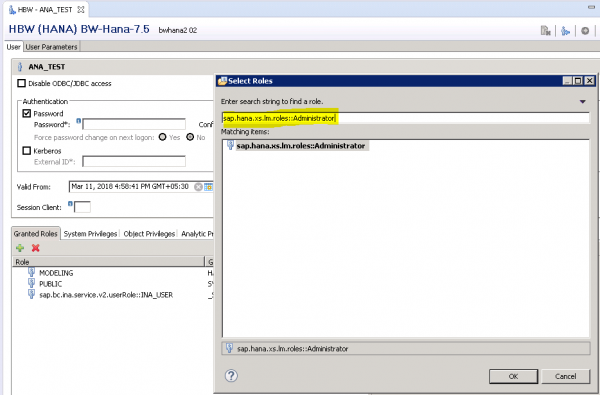
Adding LCM Administrator role to a user profile in SAP HANA
To add a role to user profile, open user profile in HANA Studio by navigating to Security folder. Go to Roles tab and click on “+” sign. In search window you have to search for this role − “sap.hana.xs.lm.roles::Administrator”

Updated on: 2020-06-25T08:06:57+05:30
309 Views

Advertisements