
- Trending Categories
 Data Structure
 Networking
 RDBMS
RDBMS Operating System
 Java
Java MS Excel
 iOS
iOS HTML
HTML CSS
CSS Android
 Python
 C Programming
 C++
C++ C#
C# MongoDB
 MySQL
MySQL Javascript
 PHP
PHP Physics
 Chemistry
 Biology
 Mathematics
 English
 Economics
 Psychology
 Social Studies
 Fashion Studies
 Legal Studies
- Selected Reading
- UPSC IAS Exams Notes
- Developer's Best Practices
- Questions and Answers
- Effective Resume Writing
- HR Interview Questions
- Computer Glossary
- Who is Who
Creating column table in SAP HANA database
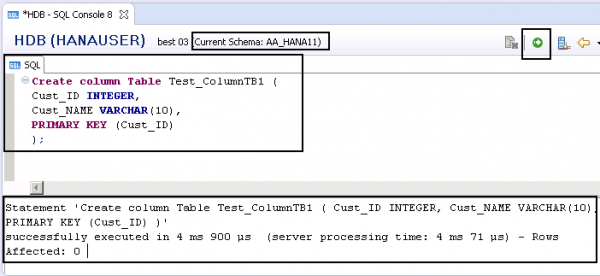
To create a Column store table, you need to enter “Column” keyword in Create table command.
Create column Table Test_ColumnTB1 (
   Cust_ID INTEGER,
   Cust_NAME VARCHAR(10),
   PRIMARY KEY (Cust_ID)
);

Updated on: 2020-06-22T09:27:22+05:30
3K+ Views

Advertisements