
- Trending Categories
 Data Structure
 Networking
 RDBMS
RDBMS Operating System
 Java
Java MS Excel
 iOS
iOS HTML
HTML CSS
CSS Android
 Python
 C Programming
 C++
C++ C#
C# MongoDB
 MySQL
MySQL Javascript
 PHP
PHP Physics
 Chemistry
 Biology
 Mathematics
 English
 Economics
 Psychology
 Social Studies
 Fashion Studies
 Legal Studies
- Selected Reading
- UPSC IAS Exams Notes
- Developer's Best Practices
- Questions and Answers
- Effective Resume Writing
- HR Interview Questions
- Computer Glossary
- Who is Who
How do I view events fired on an element in Chrome?
To view events fired on an element, follow the below steps in Google Chrome:
Open Google Chrome and press F12 to open Dev Tools.
Now go to Sources Tab
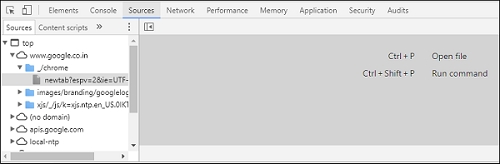
Go to Event Listener Breakpoints, on the right:
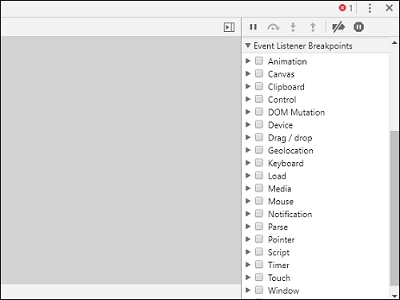
Click on the events and interact with the target element.
If the event will fire, then you will get a breakpoint in the debugger.

Updated on: 2019-07-30T22:30:22+05:30
16K+ Views

Advertisements