
- Trending Categories
 Data Structure
 Networking
 RDBMS
RDBMS Operating System
 Java
Java MS Excel
 iOS
iOS HTML
HTML CSS
CSS Android
 Python
 C Programming
 C++
C++ C#
C# MongoDB
 MySQL
MySQL Javascript
 PHP
PHP Physics
 Chemistry
 Biology
 Mathematics
 English
 Economics
 Psychology
 Social Studies
 Fashion Studies
 Legal Studies
- Selected Reading
- UPSC IAS Exams Notes
- Developer's Best Practices
- Questions and Answers
- Effective Resume Writing
- HR Interview Questions
- Computer Glossary
- Who is Who
How do you launch the JavaScript debugger in Google Chrome?
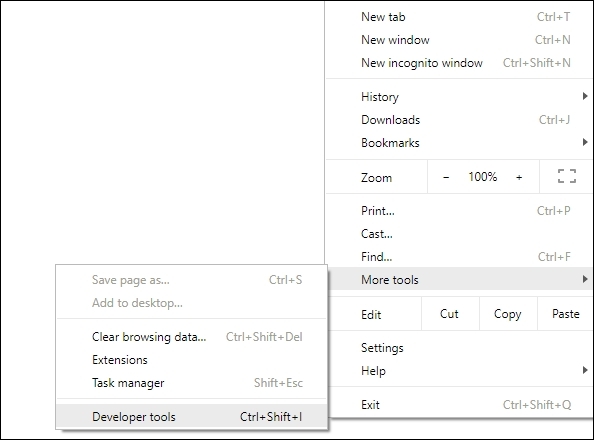
To launch JavaScript debugger in Google Chrome, try any of the following ways,
- Press Ctrl + Shift + J
- Go to Settings and click More Tools. After that, click Developer Tools.
For more, refer the official website of Chrome Dev Tool,

Updated on: 2020-06-23T06:40:20+05:30
291 Views

Advertisements