
- Trending Categories
 Data Structure
 Networking
 RDBMS
RDBMS Operating System
 Java
Java MS Excel
 iOS
iOS HTML
HTML CSS
CSS Android
 Python
 C Programming
 C++
C++ C#
C# MongoDB
 MySQL
MySQL Javascript
 PHP
PHP Physics
 Chemistry
 Biology
 Mathematics
 English
 Economics
 Psychology
 Social Studies
 Fashion Studies
 Legal Studies
- Selected Reading
- UPSC IAS Exams Notes
- Developer's Best Practices
- Questions and Answers
- Effective Resume Writing
- HR Interview Questions
- Computer Glossary
- Who is Who
Adding an image to SAP Adobe form from MIME repository
Note that Image must be uploaded from system to MIME beforehand.
Run Transaction SE78 → Upload (F5).
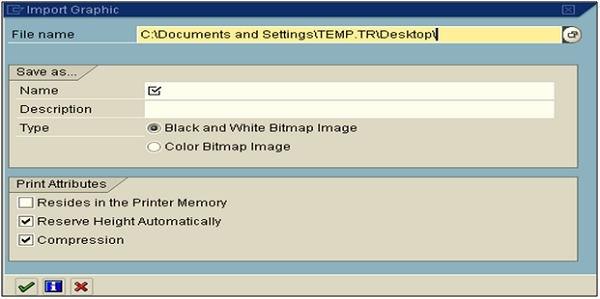
You have to declare 2 variables in the interface - global data with types string and xstring, You need to change the data declaration as below −
data: gv_bmp_watermark type xstring.
constants: gc_url_watermark type string
value '/BC/PUBLIC/MyImages/watermark100.bmp'.
You need to add the following under code initialization.
//* Read Images
data: lr_api type ref to if_mr_api.
lr_api = cl_mime_repository_api=>get_api( ).
lr_api->get( exporting i_url = gc_url_watermark
             importing e_content = gv_bmp_watermark).
You also need to change context node a bit as mentioned below −
Name: WATERMARK
Graphic Type: GRAPHIC CONTENT
Field: GV_BMP_WATERMARK
MIME Type: 'image/bmp'
For more details, you can refer below lin −:
https://archive.sap.com/discussions/thread/3519383
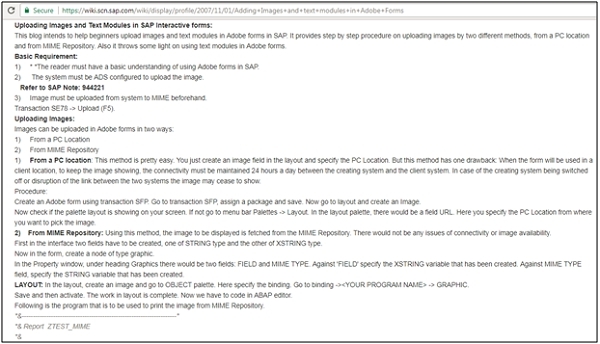
https://wiki.scn.sap.com/wiki/display/profile/2007/11/01/Adding+Images+and+text+modules+in+Adobe+Forms

Updated on: 2020-02-14T08:23:22+05:30
2K+ Views

Advertisements