
- Trending Categories
 Data Structure
 Networking
 RDBMS
RDBMS Operating System
 Java
Java MS Excel
 iOS
iOS HTML
HTML CSS
CSS Android
 Python
 C Programming
 C++
C++ C#
C# MongoDB
 MySQL
MySQL Javascript
 PHP
PHP Physics
 Chemistry
 Biology
 Mathematics
 English
 Economics
 Psychology
 Social Studies
 Fashion Studies
 Legal Studies
- Selected Reading
- UPSC IAS Exams Notes
- Developer's Best Practices
- Questions and Answers
- Effective Resume Writing
- HR Interview Questions
- Computer Glossary
- Who is Who
Alternative of click() in Selenium
There are several alternatives to the usage of click method in Selenium webdriver. We can use the JavaScript Executor to perform a click action. Selenium can execute JavaScript commands with the help of the executeScript method.
The parameters – arguments[0].click() and locator of the element on which the click is to be performed are passed to this method.
Syntax
WebElement n=driver.findElement(By.linkText("Refund"));
JavascriptExecutor j = (JavascriptExecutor) driver;
j.executeScript("arguments[0].click();", n);
Example
import org.openqa.selenium.By;
import org.openqa.selenium.WebDriver;
import org.openqa.selenium.WebElement;
import org.openqa.selenium.chrome.ChromeDriver;
import java.util.concurrent.TimeUnit;
import org.openqa.selenium.JavascriptExecutor;
public class JsClickLink{
   public static void main(String[] args) {
      System.setProperty("webdriver.chrome.driver",
         "C:\Users\ghs6kor\Desktop\Java\chromedriver.exe");
      WebDriver driver = new ChromeDriver();
      //implicit wait
      driver.manage().timeouts().implicitlyWait(5, TimeUnit.SECONDS);
      //launch URL
      driver.get("https://www.tutorialspoint.com/index.htm");
      // identify element
      WebElement m = driver.findElement(By.xpath("//a[@title='TutorialsPoint - Home']"));
      // click with Javascript Executor
      JavascriptExecutor j = (JavascriptExecutor) driver;
      j.executeScript("arguments[0].click();", m);
      driver.quit();
   }
}
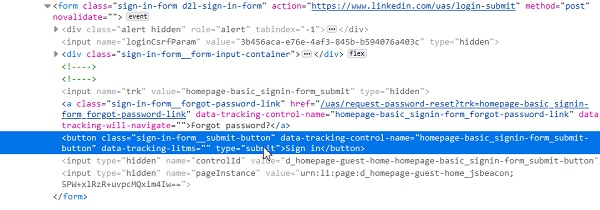
If we want to click the submit button within a form tag having the value of type attribute as submit, it can be done using the submit method.
Let us the html code of a button with type=submit within the form tag.
Example
import org.openqa.selenium.By;
import org.openqa.selenium.WebDriver;
import org.openqa.selenium.WebElement;
import org.openqa.selenium.firefox.FirefoxDriver;
import java.util.concurrent.TimeUnit;
public class ClsNameStrategy{
   public static void main(String[] args) {
      System.setProperty("webdriver.gecko.driver",
         "C:\Users\ghs6kor\Desktop\Java\geckodriver.exe");
      WebDriver driver = new FirefoxDriver();
      //implicit wait
      driver.manage().timeouts().implicitlyWait(5, TimeUnit.SECONDS);
      //URL launch
      driver.get("https://www.linkedin.com/");
      // identify element
      WebElement l = driver.findElement(By.className("input__input"));
      l.sendKeys("test@gmail.com");
      WebElement x = driver.findElement(By.id("session_password"));

      x.sendKeys("1258147");
      WebElement m = driver.
      findElement(By.cssSelector("button[type='submit']"));
      //click button with type submit
      m.submit();
      driver.close();
   }
}
Updated on: 2021-04-06T11:58:14+05:30
6K+ Views

Advertisements