
- Trending Categories
 Data Structure
 Networking
 RDBMS
RDBMS Operating System
 Java
Java MS Excel
 iOS
iOS HTML
HTML CSS
CSS Android
 Python
 C Programming
 C++
C++ C#
C# MongoDB
 MySQL
MySQL Javascript
 PHP
PHP Physics
 Chemistry
 Biology
 Mathematics
 English
 Economics
 Psychology
 Social Studies
 Fashion Studies
 Legal Studies
- Selected Reading
- UPSC IAS Exams Notes
- Developer's Best Practices
- Questions and Answers
- Effective Resume Writing
- HR Interview Questions
- Computer Glossary
- Who is Who
Auto-format code in Arduino IDE
Formatting the code is quite important to make it readable. It is recommended that you properly format the code regularly, and especially before sharing it with someone else.
Follow these steps to auto-format code in Arduino IDE −
- Go to Tools
- Click on Auto Format
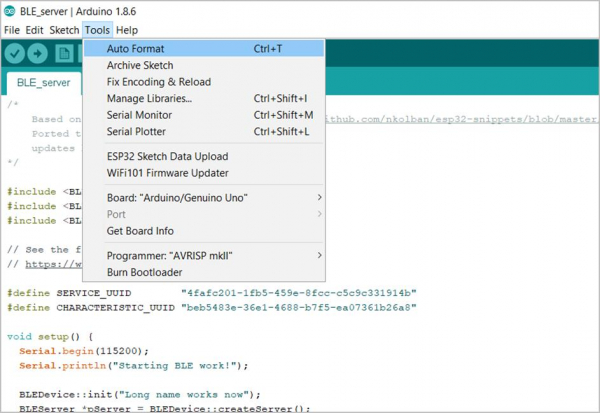
Alternatively, you can press Ctrl+T on your keyboard. This will format the code and add the correct indentations wherever required.
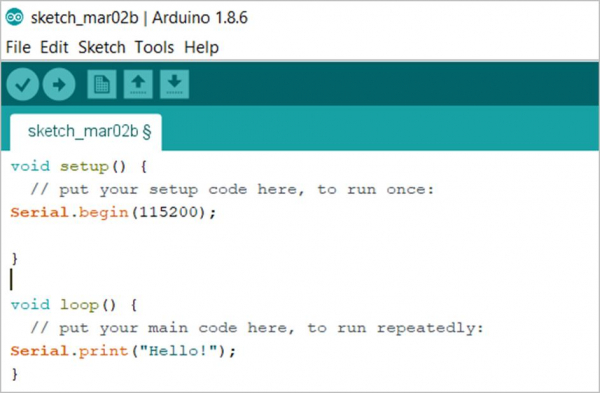
Before Auto-Format
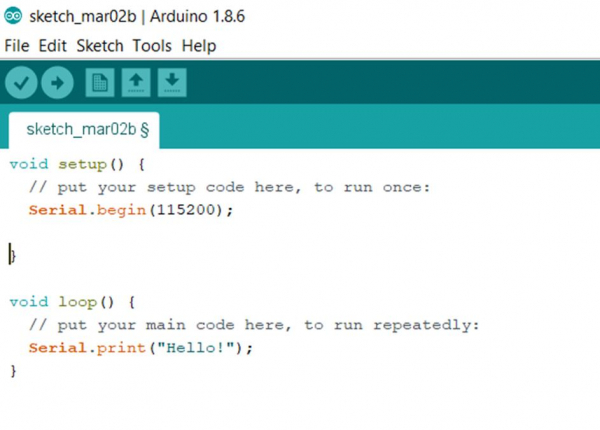
After Auto-Format

Updated on: 2021-03-23T11:01:59+05:30
4K+ Views

Advertisements