
- Trending Categories
 Data Structure
 Networking
 RDBMS
RDBMS Operating System
 Java
Java MS Excel
 iOS
iOS HTML
HTML CSS
CSS Android
 Python
 C Programming
 C++
C++ C#
C# MongoDB
 MySQL
MySQL Javascript
 PHP
PHP Physics
 Chemistry
 Biology
 Mathematics
 English
 Economics
 Psychology
 Social Studies
 Fashion Studies
 Legal Studies
- Selected Reading
- UPSC IAS Exams Notes
- Developer's Best Practices
- Questions and Answers
- Effective Resume Writing
- HR Interview Questions
- Computer Glossary
- Who is Who
Configuring a trusted RFC to be used in SLT Replication in SAP HANA
This can be done using T-code: ltr
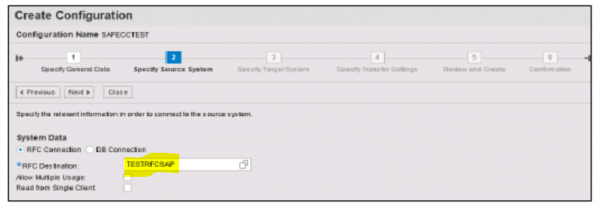
Click on New → New Window will open → Enter configuration name -> Click Next -> Enter RFC Destination i.e. connection name you have created and click on search option, choose name and click next.

Updated on: 2019-07-30T22:30:22+05:30
491 Views

Advertisements