
- Trending Categories
 Data Structure
 Networking
 RDBMS
RDBMS Operating System
 Java
Java MS Excel
 iOS
iOS HTML
HTML CSS
CSS Android
 Python
 C Programming
 C++
C++ C#
C# MongoDB
 MySQL
MySQL Javascript
 PHP
PHP Physics
 Chemistry
 Biology
 Mathematics
 English
 Economics
 Psychology
 Social Studies
 Fashion Studies
 Legal Studies
- Selected Reading
- UPSC IAS Exams Notes
- Developer's Best Practices
- Questions and Answers
- Effective Resume Writing
- HR Interview Questions
- Computer Glossary
- Who is Who
Convert PDF to CSV using Python
Python is well known for its huge library of packages. With the help of libraries, we will see how to convert a PDF to a CSV file. A CSV file is nothing but a collection of data, framed along with a set of rows and columns. There are various packages available in the Python library to convert PDF to CSV, but we will use the Tabula-py module. The major part of tabula-py is written in Java that first reads the PDF document and converts the Python DataFrame into a JSON object.
In order to work with tabula-py, we must have Java preinstalled in our system. To convert the PDF file to CSV, we will follow these steps −
First, Install the required package by typing pip install tabula-py in the command shell.
Now, read the file using read_pdf("file location", pages=number) function. This will return the DataFrame.
Convert the DataFrame into an Excel file using tabula.convert_into(‘pdf-filename’, ‘name_this_file.csv’,output_format= "csv", pages= "all"). It generally exports the pdf file into an excel file.
Example
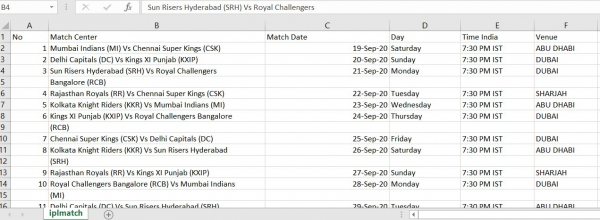
In this example, we have used IPL Match Schedule Document to convert it into an Excel file.
# Import the required Module
import tabula
# Read a PDF File
df = tabula.read_pdf("IPLmatch.pdf", pages='all')[0]
# convert PDF into CSV
tabula.convert_into("IPLmatch.pdf", "iplmatch.csv", output_format="csv", pages='all')
print(df)
Output
Running the above code will convert the PDF file into an Excel (CSV) file.

17K+ Views
