
- Trending Categories
 Data Structure
 Networking
 RDBMS
RDBMS Operating System
 Java
Java MS Excel
 iOS
iOS HTML
HTML CSS
CSS Android
 Python
 C Programming
 C++
C++ C#
C# MongoDB
 MySQL
MySQL Javascript
 PHP
PHP Physics
 Chemistry
 Biology
 Mathematics
 English
 Economics
 Psychology
 Social Studies
 Fashion Studies
 Legal Studies
- Selected Reading
- UPSC IAS Exams Notes
- Developer's Best Practices
- Questions and Answers
- Effective Resume Writing
- HR Interview Questions
- Computer Glossary
- Who is Who
Explain the Stroke Width property of 2D shapes in JavaFX
The stroke width property specifies the width of the boundary line of a shape. You can set the width using the setWidth() method of the javafx.scene.shape.Shape class. This method accepts double value as a parameter and draws a boundary of the specified width.
If you haven’t passed any value as a parameter to this method it considers the width as 1.0 by default.
Example
import javafx.application.Application;
import javafx.scene.Group;
import javafx.scene.Scene;
import javafx.scene.paint.Color;
import javafx.scene.shape.Polygon;
import javafx.scene.text.Font;
import javafx.scene.text.FontPosture;
import javafx.scene.text.FontWeight;
import javafx.scene.text.Text;
import javafx.stage.Stage;
public class StrokeWidthExample extends Application {
   public void start(Stage stage) {
      Font font = Font.font("verdana", FontWeight.BOLD, FontPosture.REGULAR, 12);
      Text label1 = new Text("Original Image");
      label1.setFont(font);
      label1.setX(250.0);
      label1.setY(125.0);
      Polygon rhombus1 = new Polygon(300.0, 0.0, 250.0, 50.0, 300.0, 100.0, 350.0, 50.0);
      Text label2 = new Text("Stroke Width: none");
      label2.setFont(font);
      label2.setX(25.0);
      label2.setY(275.0);
      Polygon rhombus2 = new Polygon(100.0, 150.0, 50.0, 200.0, 100.0, 250.0, 150.0, 200.0);
      rhombus2.setStroke(Color.BLUE);
      Text label3 = new Text("Stroke Width: 3");
      label3.setFont(font);
      label3.setX(250.0);
      label3.setY(275.0);
      Polygon rhombus3 = new Polygon(300.0, 150.0, 250.0, 200.0, 300.0, 250.0, 350.0, 200.0);
      rhombus3.setStroke(Color.BLUE);
      rhombus3.setStrokeWidth(3.0);
      Text label4 = new Text("Stroke Width: 10");
      label4.setFont(font);
      label4.setX(430.0);
      label4.setY(275.0);
      Polygon rhombus4 = new Polygon(490.0, 150.0, 440, 200.0, 490.0, 250.0, 540.0, 200.0);
      rhombus4.setStroke(Color.BLUE);
      rhombus4.setStrokeWidth(10.0);
      //Creating a Group object
      Group root = new Group(label1, label2, label3, label4, rhombus1, rhombus2, rhombus3, rhombus4);
      //Creating a scene object
      Scene scene = new Scene(root, 595, 310);
      //Setting title to the Stage
      stage.setTitle("Stroke Width");
      //Adding scene to the stage
      stage.setScene(scene);
      //Displaying the contents of the stage
      stage.show();
   }
   public static void main(String args[]){
      launch(args);
   }
}
Output
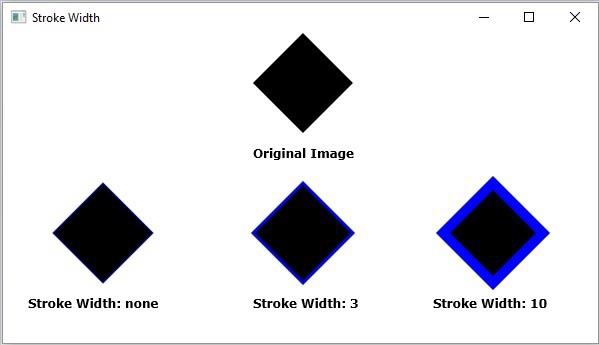

Updated on: 2020-04-14T07:21:06+05:30
2K+ Views

Advertisements