
- Trending Categories
 Data Structure
 Networking
 RDBMS
RDBMS Operating System
 Java
Java MS Excel
 iOS
iOS HTML
HTML CSS
CSS Android
 Python
 C Programming
 C++
C++ C#
C# MongoDB
 MySQL
MySQL Javascript
 PHP
PHP Physics
 Chemistry
 Biology
 Mathematics
 English
 Economics
 Psychology
 Social Studies
 Fashion Studies
 Legal Studies
- Selected Reading
- UPSC IAS Exams Notes
- Developer's Best Practices
- Questions and Answers
- Effective Resume Writing
- HR Interview Questions
- Computer Glossary
- Who is Who
How can we implement an editable JLabel in Java?\\n
In this article, we will learn to implement an editable JLabel in Java. An editable JLabel is a label component that can be converted to an editable text field when clicked.
JLabel
A JLabel class can extend the JComponent class, and an object of JLabel provides text instructions or information on a GUI. A JLabel can display a single line of read-only text, an image, or both text and image.
Syntax
The following is the syntax for JLabel initialization:
JLabel label = new JLabel("Tutorials Point");
A JLabel can explicitly generate a PropertyChangeListener interface.
Methods
The important methods of a JLabel are:
- setText()
- setIcon()
- setBackground()
- setOpaque()
- setHorizontalAlignment()
- setVerticalAlignment()
Creating an Editable JLabel
By default, a JLabel does not allow editing of the label. We can have an editable JLabel using the Swing CardLayout to flip between a JLabel and a JTextField.
The following is the step-by-step process for implementing an editable JLabel in Java:
Components Creation
Creates a JLabel with initial text as "Welcome to Tutorials Point", a JTextField for editing the JLabel, a CardLayout that shows one component at a time, and a JPanel using the CardLayout.
final JLabel label = new JLabel(" Welcome to Tutorials Point");
final JTextField textfield = new JTextField();
final CardLayout cl = new CardLayout();
final JPanel panel = new JPanel(cl);
Adding Components to the Panel
Adds both label and textfield to the panel, and then adds the panel to the JFrame.
panel.add(label, "label component");
panel.add(textfield, "textfield component");
add(panel);
Mouse Listeners for Label
When the mouse enters the label using the mouse listener, it copies the label text to the textfield, and shows the textfield using CardLayout.
label.addMouseListener(new MouseAdapter() {
   public final void mouseEntered(MouseEvent evt) {
      textfield.setText(label.getText());
      cl.show(panel, "textfield component");
   }
});
Mouse Listeners for TextField
When the mouse exits the textfield, it copies the textfield content back to the label, and shows the label with the edited text.
textfield.addMouseListener(new MouseAdapter() {
   public final void mouseExited(MouseEvent evt) {
      label.setText(textfield.getText());
      cl.show(panel, "label component");
   }
});
Example
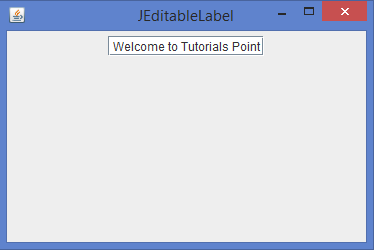
Below is an example of implementing an editable JLabel in Java:
import java.awt.*;
import java.awt.event.*;
import javax.swing.*;
import java.text.*;
public class JEditableLabel extends JFrame {
   public JEditableLabel() {
      setTitle("JEditableLabel");
      setLayout(new FlowLayout());
      final JLabel label = new JLabel("Welcome to Tutorials Point");
      final JTextField textfield = new JTextField();
      final CardLayout cl = new CardLayout();
      final JPanel panel = new JPanel(cl);
      panel.add(label, "label component");
      panel.add(textfield, "textfield component");
      add(panel);
      label.addMouseListener(new MouseAdapter() {
         public final void mouseEntered(MouseEvent evt) {
            textfield.setText(label.getText());
            cl.show(panel, "textfield component");
         }
      });
      textfield.addMouseListener(new MouseAdapter() {
         public final void mouseExited(MouseEvent evt) {
            label.setText(textfield.getText());
            cl.show(panel, "label component");
         }
      });
      setSize(375, 250);
      setDefaultCloseOperation(JFrame.EXIT_ON_CLOSE);
      setLocationRelativeTo(null);
      setVisible(true);
   }
   public static void main(String[] args) {
      new JEditableLabel();
   }
}
Output

457 Views
