
- Trending Categories
 Data Structure
 Networking
 RDBMS
RDBMS Operating System
 Java
Java MS Excel
 iOS
iOS HTML
HTML CSS
CSS Android
 Python
 C Programming
 C++
C++ C#
C# MongoDB
 MySQL
MySQL Javascript
 PHP
PHP Physics
 Chemistry
 Biology
 Mathematics
 English
 Economics
 Psychology
 Social Studies
 Fashion Studies
 Legal Studies
- Selected Reading
- UPSC IAS Exams Notes
- Developer's Best Practices
- Questions and Answers
- Effective Resume Writing
- HR Interview Questions
- Computer Glossary
- Who is Who
How can we implement right click menu using JPopupMenu in Java?
In this article, we will learn to implement right right-click menu using JPopupMenu in Java. A JPopupMenu appears anywhere on the screen when the right mouse button is clicked.
JPopupMenu
A JPopupMenu menu is a free-floating menu that is associated with an underlying component called the invoker. Most of the time, a popup menu is linked to a specific component to display context-sensitive choices.
Syntax
The following is the syntax for JPopupMenu initialization:
JPopupMenu popup = new JPopupMenu();
In order to create a popup menu, we can use the JPopupMenu class., We can add the JMenuItem to the popup menu like a normal menu.
Implementing Right-Click Menu on JPopupMenu
To display the popup menu, we can call the show() method, normally popup menu is called in response to a mouse event. The following is the step-by-step for implementing the right-click menu on JPopupMenu in Java:
Class Declaration and Imports
The javax.swing.* provides Swing components (JPopupMenu, JFrame, etc.) while the java.awt.* provides AWT classes (Color, layout managers), and the class extends JFrame to create a window.
import java.awt.event.;
import java.awt.;
import javax.swing.*;
public class JPopupMenuTest extends JFrame {
Instance Variable & Constructor
Declares popup as a JPopupMenu component. The constructor sets the JFrame window titled "JPopupMenu Test". Gets the frame's content pane and initializes the JPopupMenu.
private JPopupMenu popup;
public JPopupMenuTest() {
      setTitle("JPopupMenu Test");
      Container contentPane = getContentPane() ;
      popup = new JPopupMenu();
Adding Menu Items
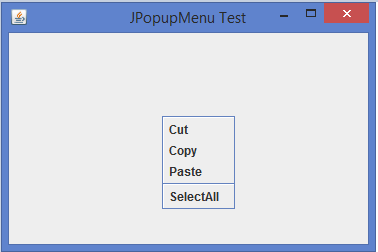
Adds menu items as Cut, Copy, and Paste to the popup, inserts a separator line using the addSeparator() method, and adds Select All as another menu item.
popup.add(new JMenuItem("Cut"));
popup.add(new JMenuItem("Copy"));
popup.add(new JMenuItem("Paste"));
popup.addSeparator();
popup.add(new JMenuItem("SelectAll"));
Mouse Listener Setup
Sets up a MouseAdapter and overrides the mouseReleased()method to display the popup when the mouse is released.
contentPane.addMouseListener(new MouseAdapter() {
   public void mouseReleased(MouseEvent me) {
      showPopup(me);
   }
});
showPopup() method
The show() method displays the popup menu at the mouse coordinates (getX(), getY()).
popup.show(me.getComponent(), me.getX(), me.getY());
Main Method
The main method launches the application by creating an object of JPopupMenuTest.
public static void main(String args[]) {
   new JPopupMenuTest();
}
Example
Below is an example of implementing the right-click menu on JPopupMenu in Java:
import java.awt.event.*;
import java.awt.*;
import javax.swing.*;
public class JPopupMenuTest extends JFrame {
   private JPopupMenu popup;
   public JPopupMenuTest() {
      setTitle("JPopupMenu Test");
      Container contentPane = getContentPane() ;
      popup = new JPopupMenu();
      // add menu items to popup
      popup.add(new JMenuItem("Cut"));
      popup.add(new JMenuItem("Copy"));
      popup.add(new JMenuItem("Paste"));
      popup.addSeparator();
      popup.add(new JMenuItem("SelectAll"));
      contentPane.addMouseListener(new MouseAdapter() {
         public void mouseReleased(MouseEvent me) {
            showPopup(me); // showPopup() is our own user-defined method
         }
      }) ;
      setSize(375, 250);
      setDefaultCloseOperation(JFrame.EXIT_ON_CLOSE);
      setLocationRelativeTo(null);
      setVisible(true);
   }
   void showPopup(MouseEvent me) {
      if(me.isPopupTrigger())
         popup.show(me.getComponent(), me.getX(), me.getY());
   }
   public static void main(String args[]) {
      new JPopupMenuTest();
   }
}
Output

2K+ Views
