
- Trending Categories
 Data Structure
 Networking
 RDBMS
RDBMS Operating System
 Java
Java MS Excel
 iOS
iOS HTML
HTML CSS
CSS Android
 Python
 C Programming
 C++
C++ C#
C# MongoDB
 MySQL
MySQL Javascript
 PHP
PHP Physics
 Chemistry
 Biology
 Mathematics
 English
 Economics
 Psychology
 Social Studies
 Fashion Studies
 Legal Studies
- Selected Reading
- UPSC IAS Exams Notes
- Developer's Best Practices
- Questions and Answers
- Effective Resume Writing
- HR Interview Questions
- Computer Glossary
- Who is Who
How many types of selection modes for a JList in Java?
A JList is a component that can extend JComponent class used to display a list of objects that allows the user to select one or more items.
There are three types of selection modes for a JList in Java
- ListSelectionModel.SINGLE_SELECTION: Only one list index can be selected at a time.
- ListSelectionModel.SINGLE_INTERVAL_SELECTION: Only one contiguous interval can be selected at a time.
- ListSelectionModel.MULTIPLE_INTERVAL_SELECTION: In this mode, there is no restriction on what can be selected. This is a default mode.
Example
import java.awt.*;
import java.awt.event.*;
import javax.swing.*;
public class JListSelectionModeTest extends JFrame implements ActionListener {
   private JList list;
   private DefaultListModel listModel;
   public JListSelectionModeTest() {
      setTitle("JListSelectionMode Test");
      setLayout(new BorderLayout());
      listModel = new DefaultListModel();
      for (int i = 1; i < 10; i++) {
         listModel.addElement("list item #" + i);
      }
      list = new JList(listModel);
      add(new JScrollPane(list), BorderLayout.CENTER);
      JPanel panel = new JPanel(new GridLayout(3, 1));
      JRadioButton rb1 = new JRadioButton("SINGLE_SELECTION");
      rb1.addActionListener(this);
      JRadioButton rb2 = new JRadioButton("SINGLE_INTERVAL_SELECTION");
      rb2.addActionListener(this);
      JRadioButton rb3 = new JRadioButton("MULTIPLE_INTERVAL_SELECTION");
      rb3.addActionListener(this);
      ButtonGroup bg = new ButtonGroup();
      bg.add(rb1);
      bg.add(rb2);
      bg.add(rb3);
      panel.add(rb1);
      panel.add(rb2);
      panel.add(rb3);
      add(panel, BorderLayout.NORTH);
      setSize(350, 275);
      setDefaultCloseOperation(JFrame.EXIT_ON_CLOSE);
      setLocationRelativeTo(null);
      setVisible(true);
   }
   public void actionPerformed(ActionEvent ae) {
      if (ae.getActionCommand().equals("SINGLE_SELECTION"))
         list.getSelectionModel().setSelectionMode(ListSelectionModel.SINGLE_SELECTION);
      else if (ae.getActionCommand().equals("SINGLE_INTERVAL_SELECTION"))
         list.getSelectionModel().setSelectionMode(ListSelectionModel.SINGLE_INTERVAL_SELECTION);
      else if (ae.getActionCommand().equals("MULTIPLE_INTERVAL_SELECTION"))
         list.getSelectionModel().setSelectionMode(ListSelectionModel.MULTIPLE_INTERVAL_SELECTION);
   }
   public static void main(String[] args) {
      new JListSelectionModeTest();
   }
}
Output
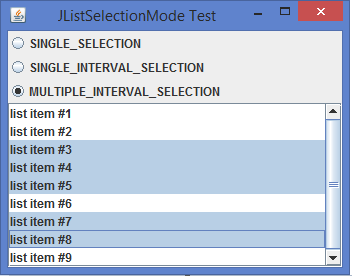

Updated on: 2020-02-10T07:01:22+05:30
817 Views

Advertisements