
- Trending Categories
 Data Structure
 Networking
 RDBMS
RDBMS Operating System
 Java
Java MS Excel
 iOS
iOS HTML
HTML CSS
CSS Android
 Python
 C Programming
 C++
C++ C#
C# MongoDB
 MySQL
MySQL Javascript
 PHP
PHP Physics
 Chemistry
 Biology
 Mathematics
 English
 Economics
 Psychology
 Social Studies
 Fashion Studies
 Legal Studies
- Selected Reading
- UPSC IAS Exams Notes
- Developer's Best Practices
- Questions and Answers
- Effective Resume Writing
- HR Interview Questions
- Computer Glossary
- Who is Who
How to add group labels for bar charts in Matplotlib?
To make grouped labels for bar charts, we can take the following steps −
Create lists for labels, men_means and women_means with different data elements.
Return evenly spaced values within a given interval, using numpy.arrange() method.
Set the width variable, i.e., width=0.35.
Create fig and ax variables using subplots method, where default nrows and ncols are 1.
The bars are positioned at *x* with the given *align*\ment. Their dimensions are given by *height* and *width*. The vertical baseline is *bottom* (default 0), so create rect1 and rect2 using plt.bar() method.
Set the Y-Axis label using plt.ylabel() method.
Set a title for the axes using set_title() method.
Get or set the current tick locations and labels of the X-axis, using set_xticks() method.
Set X-axis tick labels of the grid, using set_xticklabels() method.
Place a legend on the figure, using legend() method.
Annotate created bars (rect1 and rect2) with some label using autolabel() method, that is userdefined method.
To show the figure, use the plt.show() method.
Example
import matplotlib.pyplot as plt
import numpy as np

plt.rcParams["figure.figsize"] = [7.00, 3.50]
plt.rcParams["figure.autolayout"] = True
labels = ['G1', 'G2', 'G3', 'G4', 'G5']
men_means = [20, 34, 30, 35, 27]
women_means = [25, 32, 34, 20, 25]
x = np.arange(len(labels))
width = 0.35
fig, ax = plt.subplots()
rects1 = ax.bar(x - width / 2, men_means, width, label='Men')
rects2 = ax.bar(x + width / 2, women_means, width, label='Women')
ax.set_ylabel('Scores')
ax.set_title('Scores by group and gender')
ax.set_xticks(x)
ax.set_xticklabels(labels)
ax.legend()

def autolabel(rects):
   for rect in rects:
      height = rect.get_height()
      ax.annotate('{}'.format(height),
         xy=(rect.get_x() + rect.get_width() / 2, height),
         xytext=(0, 3), # 3 points vertical offset
         textcoords="offset points",
         ha='center', va='bottom')

autolabel(rects1)
autolabel(rects2)
plt.show()
Output
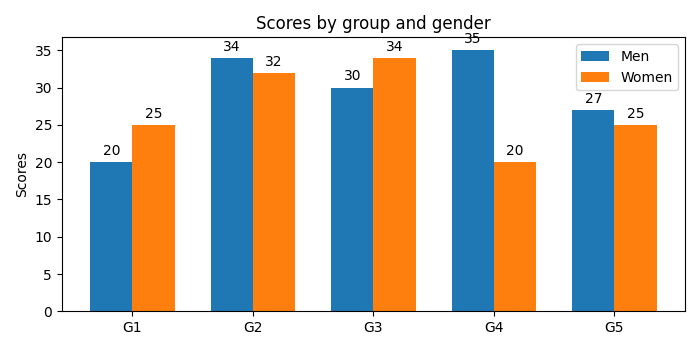

1K+ Views
