
- Trending Categories
 Data Structure
 Networking
 RDBMS
RDBMS Operating System
 Java
Java MS Excel
 iOS
iOS HTML
HTML CSS
CSS Android
 Python
 C Programming
 C++
C++ C#
C# MongoDB
 MySQL
MySQL Javascript
 PHP
PHP Physics
 Chemistry
 Biology
 Mathematics
 English
 Economics
 Psychology
 Social Studies
 Fashion Studies
 Legal Studies
- Selected Reading
- UPSC IAS Exams Notes
- Developer's Best Practices
- Questions and Answers
- Effective Resume Writing
- HR Interview Questions
- Computer Glossary
- Who is Who
How to add various fonts to text using text flow in JavaFX?
You can have multiple text nodes in a single flow using the TextFlow layout. To have different fonts to single text flow.
Create multiple text nodes.
Set desired fonts to them.
Add all the created nodes to the text flow.
Example
import java.io.FileNotFoundException;
import javafx.application.Application;
import javafx.scene.Group;
import javafx.scene.Scene;
import javafx.scene.paint.Color;
import javafx.stage.Stage;
import javafx.scene.text.Font;
import javafx.scene.text.FontWeight;
import javafx.scene.text.Text;
import javafx.scene.text.TextFlow;
public class TextFlowExample extends Application {
   public void start(Stage stage) throws FileNotFoundException {
      //Creating a text object
      String str1 = "Hi ";
      Text text1 = new Text(30.0, 110.0, str1);
      //Setting the font
      Font font1 = Font.font("Brush Script MT", FontWeight.BOLD, 75);
      text1.setFont(font1);
      //Setting the color of the text
      text1.setFill(Color.CORAL);
      text1.setStrokeWidth(1);
      text1.setStroke(Color.CHOCOLATE);
      String str2 = "Welcome To";
      Text text2 = new Text(40.0, 110.0, str2);
      Font font2 = Font.font("Verdana", FontWeight.LIGHT, 25);
      text2.setFont(font2);
      //Setting the color of the text
      text2.setFill(Color.YELLOWGREEN);
      text2.setStrokeWidth(1);
      text2.setStroke(Color.DARKRED);
      String str3 = "Tutorialspoint";
      Text text3= new Text(50.0, 110.0, str3);
      Font font3 = Font.font("Kunstler Script", FontWeight.BOLD, 80);
      text3.setFont(font3);
      //Setting the color of the text
      text3.setFill(Color.CORNFLOWERBLUE);
      text3.setStrokeWidth(1);
      text3.setStroke(Color.CRIMSON);
      //Creating the text flow
      TextFlow textFlow = new TextFlow();
      textFlow.getChildren().addAll(text1, text2, text3);
      //Setting the stage
      Group root = new Group(textFlow);
      Scene scene = new Scene(root, 595, 150, Color.BEIGE);
      stage.setTitle("Text Flow Example");
      stage.setScene(scene);
      stage.show();
   }
   public static void main(String args[]){
      launch(args);
   }
}
Output
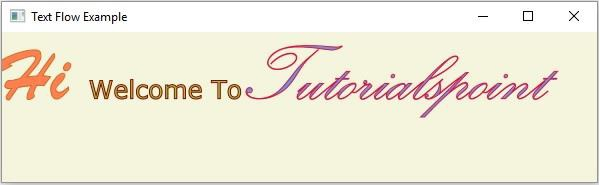

Updated on: 2020-05-16T05:50:03+05:30
378 Views

Advertisements