
- Trending Categories
 Data Structure
 Networking
 RDBMS
RDBMS Operating System
 Java
Java MS Excel
 iOS
iOS HTML
HTML CSS
CSS Android
 Python
 C Programming
 C++
C++ C#
C# MongoDB
 MySQL
MySQL Javascript
 PHP
PHP Physics
 Chemistry
 Biology
 Mathematics
 English
 Economics
 Psychology
 Social Studies
 Fashion Studies
 Legal Studies
- Selected Reading
- UPSC IAS Exams Notes
- Developer's Best Practices
- Questions and Answers
- Effective Resume Writing
- HR Interview Questions
- Computer Glossary
- Who is Who
How to convert HLS to colored image using Java OpenCV library?
The cvtColor() method of the Imgproc class changes/converts the color of the image from one to another. This method accepts three parameters −
src − A Matrix object representing source.
dst − A Matrix object representing the destination.
code − An integer value representing the color of the destination image.
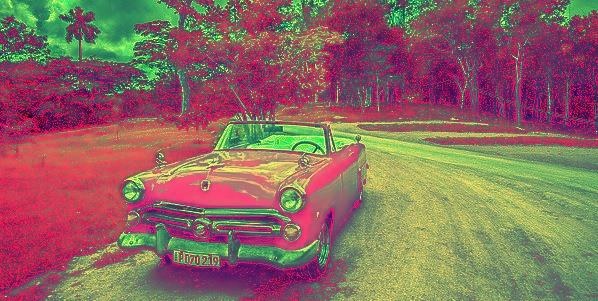
You can convert a colored image to an HLS image by passing Imgproc.COLOR_RGB2HLS as a parameter to the above method.
Example
import org.opencv.core.Core;
import org.opencv.core.Mat;
import org.opencv.imgcodecs.Imgcodecs;
import org.opencv.imgproc.Imgproc;
public class RGB2HSL {
   public static void main(String args[]) throws Exception {
      //Loading the OpenCV core library
      System.loadLibrary( Core.NATIVE_LIBRARY_NAME );
      //Reading the image
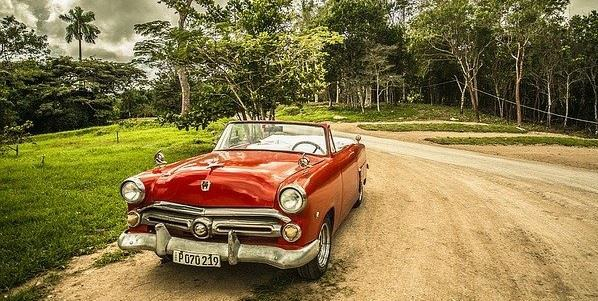
      Mat src = Imgcodecs.imread("D:\images\car.jpg");
      //Creating the empty destination matrix
      Mat dst = new Mat();
      //Converting the image to gray scale
      Imgproc.cvtColor(src, dst, Imgproc.COLOR_RGB2HLS);
      //Instantiating the Imagecodecs class
      Imgcodecs imageCodecs = new Imgcodecs();
      //Writing the image
      imageCodecs.imwrite("D:\images\hslImage.jpg", dst);
      System.out.println("Image Saved");
   }
}
Input
Output

Updated on: 2020-04-09T08:20:02+05:30
245 Views

Advertisements