
- Trending Categories
 Data Structure
 Networking
 RDBMS
RDBMS Operating System
 Java
Java MS Excel
 iOS
iOS HTML
HTML CSS
CSS Android
 Python
 C Programming
 C++
C++ C#
C# MongoDB
 MySQL
MySQL Javascript
 PHP
PHP Physics
 Chemistry
 Biology
 Mathematics
 English
 Economics
 Psychology
 Social Studies
 Fashion Studies
 Legal Studies
- Selected Reading
- UPSC IAS Exams Notes
- Developer's Best Practices
- Questions and Answers
- Effective Resume Writing
- HR Interview Questions
- Computer Glossary
- Who is Who
How to create an image to zoom with CSS and JavaScript?
Following is the code to create an image zoom:
Example
<!DOCTYPE html>
<html>
<head>
<meta name="viewport" content="width=device-width, initial-scale=1.0">
<style>
   * {box-sizing: border-box;}
   .img{
      display: inline-block;
   }
   .img-zoom-container {
      position: relative;
   }
   .img-zoom-zoomLens {
      position: absolute;
      border: 1px solid #d4d4d4;
      width: 50px;
      height: 50px;
   }
   .myresult{
      display: inline-block;
   }
   .img-zoom-result {
      border: 1px solid #d4d4d4;
   }
</style>
</head>
<body>
<h1>Image Zoom Example</h1>
<div class="img-zoom-container">
<img class="myimage" src="https://i.picsum.photos/id/1015/536/354.jpg?hmac=x7KEhPoOftwPXIgnQoTQzNtVUqaPYwndK8n1x_9rWuM" style="width: 400px; height: 400px;">
<div class="myresult" class="img-zoom-result" style="width: 400px;height: 400px;"></div>
</div>
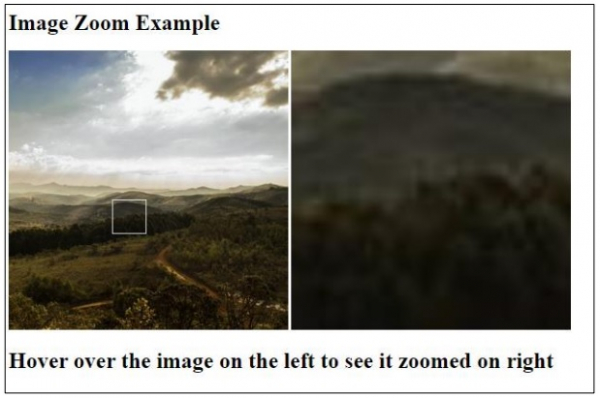
<h1>Hover over the image on the left to see it zoomed on right</h1>
<script>
   let imageEle = document.querySelector('.myimage');
   let resultEle = document.querySelector('.myresult');
   enlargeImage(imageEle, resultEle);
   function enlargeImage(imgEle, resultEle) {
      var zoomLens, xPos, yPos;
      zoomLens = document.createElement("DIV");
      zoomLens.setAttribute("class", "img-zoom-zoomLens");
      imgEle.parentElement.insertBefore(zoomLens, imgEle);
      xPos = resultEle.offsetWidth / zoomLens.offsetWidth;
      yPos = resultEle.offsetHeight / zoomLens.offsetHeight;
      resultEle.style.backgroundImage = `url(${imgEle.src})`;
      resultEle.style.backgroundSize = (imgEle.width * xPos) + "px " + (imgEle.height * yPos) + "px";
      zoomLens.addEventListener("mousemove", lensMoveCalculate);
      imgEle.addEventListener("mousemove", lensMoveCalculate);
      zoomLens.addEventListener("touchmove", lensMoveCalculate);
      imgEle.addEventListener("touchmove", lensMoveCalculate);
      function lensMoveCalculate(e) {
         var pos, x, y;
         pos = currentCursonPos(e);
         x = pos.x - (zoomLens.offsetWidth / 2);
         y = pos.y - (zoomLens.offsetHeight / 2);
         if (x > imgEle.width - zoomLens.offsetWidth) {x = imgEle.width - zoomLens.offsetWidth;}
         if (x < 0) {x = 0;}
         if (y > imgEle.height - zoomLens.offsetHeight) {y = imgEle.height - zoomLens.offsetHeight;}
         if (y < 0) {y = 0;}
         zoomLens.style.left = x + "px";
         zoomLens.style.top = y + "px";
         resultEle.style.backgroundPosition = "-" + (x * xPos) + "px -" + (y * yPos) + "px";
      }
      function currentCursonPos(e) {
         var a, x = 0, y = 0;
         e = e || window.event;
         a = imgEle.getBoundingClientRect();
         x = e.pageX - a.left;
         y = e.pageY - a.top;
         x = x - window.pageXOffset;
         y = y - window.pageYOffset;
         return {x : x, y : y};
      }
   }
</script>
</body>
</html>
Output
The above code will produce the following output:

Updated on: 2021-02-16T06:41:53+05:30
953 Views

Advertisements