
- Trending Categories
 Data Structure
 Networking
 RDBMS
RDBMS Operating System
 Java
Java MS Excel
 iOS
iOS HTML
HTML CSS
CSS Android
 Python
 C Programming
 C++
C++ C#
C# MongoDB
 MySQL
MySQL Javascript
 PHP
PHP Physics
 Chemistry
 Biology
 Mathematics
 English
 Economics
 Psychology
 Social Studies
 Fashion Studies
 Legal Studies
- Selected Reading
- UPSC IAS Exams Notes
- Developer's Best Practices
- Questions and Answers
- Effective Resume Writing
- HR Interview Questions
- Computer Glossary
- Who is Who
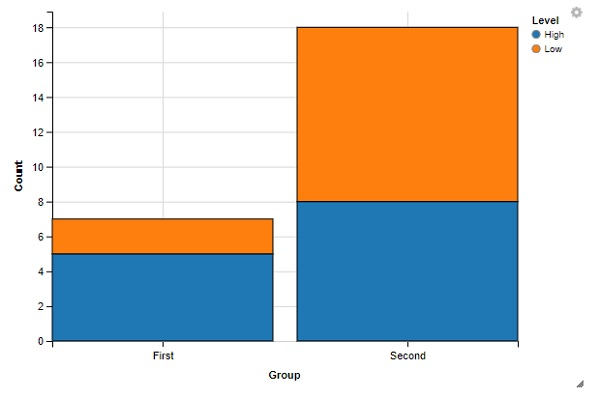
How to create stacked bar chart using ggvis in R?
To create stacked bar chart using ggvis, we can follow the below steps −
- First of all, create a data frame.
- Create the stacked bar chart with layer_bars function of ggvis package.
Create the data frame
Let's create a data frame as shown below −
Group<-c("First","Second","First","Second")
Level<-c("Low","Low","High","High")
Count<-c(2,10,5,8)
df<-data.frame(Group,Level,Count)
df
On executing, the above script generates the below output(this output will vary on your system due to randomization) −
   Group Level Count
1  First  Low    2
2  Second Low   10
3  First  High   5
4  Second High   8
Create the stacked bar chart with ggvis
Use layer_bars function of ggvis package to create the stacked bar chart for the data given in data frame df −
Group<-c("First","Second","First","Second")
Level<-c("Low","Low","High","High")
Count<-c(2,10,5,8)
df<-data.frame(Group,Level,Count)
library(ggvis)
df %>% ggvis(x=~Group, y=~Count, fill=~Level) %>% group_by(Level) %>%
layer_bars()
Output

Updated on: 2021-08-13T14:19:57+05:30
201 Views

Advertisements