
- Trending Categories
 Data Structure
 Networking
 RDBMS
RDBMS Operating System
 Java
Java MS Excel
 iOS
iOS HTML
HTML CSS
CSS Android
 Python
 C Programming
 C++
C++ C#
C# MongoDB
 MySQL
MySQL Javascript
 PHP
PHP Physics
 Chemistry
 Biology
 Mathematics
 English
 Economics
 Psychology
 Social Studies
 Fashion Studies
 Legal Studies
- Selected Reading
- UPSC IAS Exams Notes
- Developer's Best Practices
- Questions and Answers
- Effective Resume Writing
- HR Interview Questions
- Computer Glossary
- Who is Who
How to Create the path element line in JavaFX?
The javafx.scene.shape.LineTo class represents the path element line. It helps you to draw a straight line from the current coordinates to the specified (new) coordinates.
To create a line path element −
Instantiate the LineTo class.
Set values to the properties of this class using setter methods or, bypassing them to the constructor.
Instantiate the Path class.
Get the observable list object of the above-created Path using the getElements() method.
Add the above created LineTo object to the observable list using the add() method.
Finally, add the path to the Group object.
Example
import javafx.application.Application;
import javafx.scene.Group;
import javafx.scene.Scene;
import javafx.scene.paint.Color;
import javafx.stage.Stage;
import javafx.scene.shape.LineTo;
import javafx.scene.shape.MoveTo;
import javafx.scene.shape.Path;
public class LineToExample extends Application {
   public void start(Stage stage) {
      //Creating PathElement objects
      MoveTo moveTo = new MoveTo(208, 71);
      LineTo line1 = new LineTo(421, 161);
      LineTo line2 = new LineTo(226,232);
      LineTo line3 = new LineTo(332,52);
      //Creating a Path
      Path path = new Path();
      path.getElements().addAll(moveTo, line1, line2, line3);
      //Setting other properties
      path.setStrokeWidth(8.0);
      path.setStroke(Color.DARKSLATEGREY);
     //Preparing the Stage object
      Group root = new Group(path);
      Scene scene = new Scene(root, 595, 300, Color.BEIGE);
      stage.setTitle("JavaFX Example");
      stage.setScene(scene);
      stage.show();
   }
   public static void main(String args[]){
      launch(args);
   }
}
Output
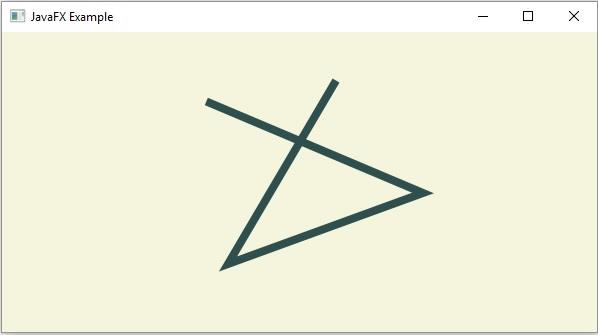

Updated on: 2020-04-13T12:03:42+05:30
131 Views

Advertisements