
- Trending Categories
 Data Structure
 Networking
 RDBMS
RDBMS Operating System
 Java
Java MS Excel
 iOS
iOS HTML
HTML CSS
CSS Android
 Python
 C Programming
 C++
C++ C#
C# MongoDB
 MySQL
MySQL Javascript
 PHP
PHP Physics
 Chemistry
 Biology
 Mathematics
 English
 Economics
 Psychology
 Social Studies
 Fashion Studies
 Legal Studies
- Selected Reading
- UPSC IAS Exams Notes
- Developer's Best Practices
- Questions and Answers
- Effective Resume Writing
- HR Interview Questions
- Computer Glossary
- Who is Who
How to detect humans in an image in OpenCV Python?
To detect humans in an image and draw bounding boxes around them, you can use the steps given below ?
Import the required library. In all the following examples, the required Python library is OpenCV. Make sure you have already installed it.
Read the input image using cv2.imread() in a grayscale. Specify the full image path.
Initialize a HOG descriptor object hog = cv2.HOGDescriptor() and set the SVM detector as hog.setSVMDetector() as default people detector.
Detect humans in the input image using hog.detectMultiScale(). It returns the coordinates of detected humans in (x,y,w,h) format.
Loop over all detected humans in the image and draw the bounding rectangles around the detected humans in the original image using cv2.rectangle().
Display the image with the drawn bounding rectangles around the humans.
Let's have a look at the example below for more clear understanding.
We will use this image as the Input File for the following example ?
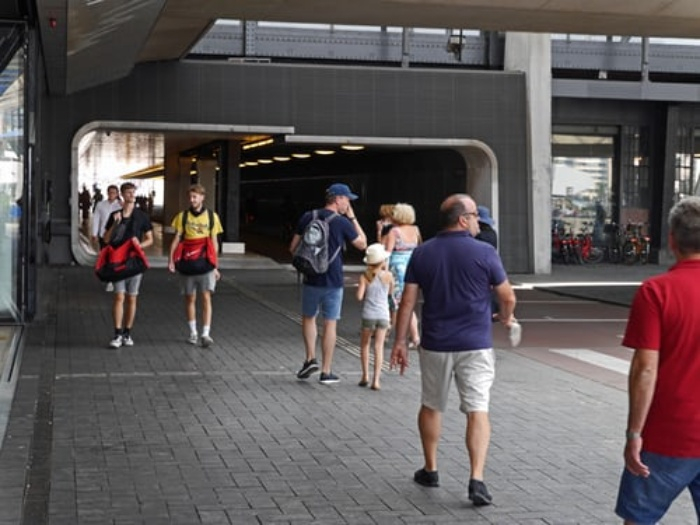
Example
In this example, detect humans in the input image using the Hog descriptor.
# import required libraries
import cv2

# Reading the Image
image = cv2.imread('people1.jpg')

# initialize the HOG descriptor
hog = cv2.HOGDescriptor()
hog.setSVMDetector(cv2.HOGDescriptor_getDefaultPeopleDetector())

# detect humans in input image
(humans, _) = hog.detectMultiScale(image, winStride=(10, 10),
padding=(32, 32), scale=1.1)

# getting no. of human detected
print('Human Detected : ', len(humans))

# loop over all detected humans
for (x, y, w, h) in humans:
   pad_w, pad_h = int(0.15 * w), int(0.01 * h)
   cv2.rectangle(image, (x + pad_w, y + pad_h), (x + w - pad_w, y + h - pad_h), (0, 255, 0), 2)

# display the output image
cv2.imshow("Image", image)
cv2.waitKey(0)
cv2.destroyAllWindows()
Output
When you run the above Python program, it will produce the following output ?
Human Detected: 4
And we get the following output window ?
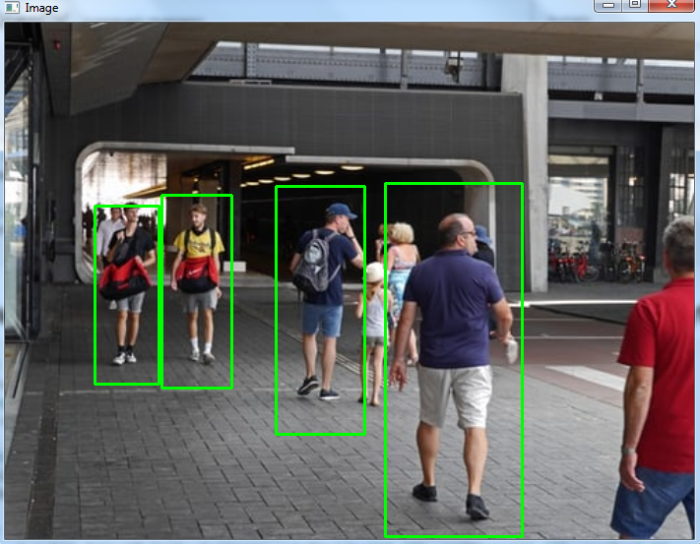
The bounding boxes around the detected humans are drawn with green color.

15K+ Views
