
- Trending Categories
 Data Structure
 Networking
 RDBMS
RDBMS Operating System
 Java
Java MS Excel
 iOS
iOS HTML
HTML CSS
CSS Android
 Python
 C Programming
 C++
C++ C#
C# MongoDB
 MySQL
MySQL Javascript
 PHP
PHP Physics
 Chemistry
 Biology
 Mathematics
 English
 Economics
 Psychology
 Social Studies
 Fashion Studies
 Legal Studies
- Selected Reading
- UPSC IAS Exams Notes
- Developer's Best Practices
- Questions and Answers
- Effective Resume Writing
- HR Interview Questions
- Computer Glossary
- Who is Who
How to draw geometrical shapes on image using OpenCV Java Library?
The org.opencv.imgproc package of Java OpenCV library contains a class named Imgproc this class provies various methods such as, resize(), wrapAffine(), filter2D, to process an input image.
In addition to them It provides a set of method to draw geometrical shapes on images, Following are some of them −
| Shape | Method and Description |
|---|---|
| Ellipse | You can draw an ellipse on an image using the ellipse() method. |
| Circle | You can draw a circle on an image using the circle() method. |
| Rectangle | You can draw a rectangle on an image using the rectangle() method. |
| Polygon | You can draw a polygon on an image using the polygon() method. |
| Line | You can draw a line on an image using the line() method |
Example
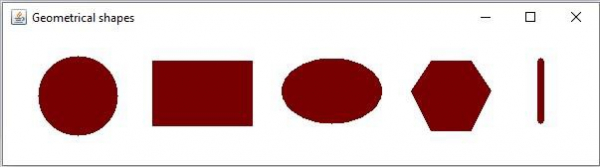
Following Java example draws various shapes on a blank OpenCV image −
import org.opencv.core.Core;
import org.opencv.core.Mat;
import org.opencv.core.MatOfPoint;
import org.opencv.core.Point;
import org.opencv.core.RotatedRect;
import org.opencv.core.Scalar;
import org.opencv.core.Size;
import org.opencv.imgcodecs.Imgcodecs;
import org.opencv.imgproc.Imgproc;
import org.opencv.highgui.HighGui;
public class DrawingGeometricalShapes {
   public static void main(String args[]) {
      System.loadLibrary( Core.NATIVE_LIBRARY_NAME );
      Mat src = Imgcodecs.imread("D:\blank.jpg");
      Scalar color = new Scalar(0, 0, 120);
      //Drawing a Circle
      Imgproc.circle(src, new Point(75, 65), 40, color, Imgproc.FILLED);
      // Drawing an Ellipse
      Imgproc.ellipse(src, new RotatedRect(new Point(330, 60), new Size(100, 65), 180), color, Imgproc.FILLED);
      //Drawing a line
      Imgproc.line(src, new Point(540,30), new Point(540, 90), color, 5);
      //Drawing filled polygon
      List<MatOfPoint> list = new ArrayList();
      list.add(new MatOfPoint (
         new Point(410, 60), new Point(430, 30),
         new Point(470, 30), new Point(490, 60),
         new Point(470, 100), new Point(430, 100))
      );
      Imgproc.fillPoly (src, list, color, 8);
      //Drawing a Rectangle
      Imgproc.rectangle(src, new Point(150, 30), new Point(250, 95),color, Imgproc.FILLED);
      HighGui.imshow("Geometrical shapes", src);
      HighGui.waitKey();
   }
}
Output

Updated on: 2020-04-10T07:44:11+05:30
513 Views

Advertisements