
- Trending Categories
 Data Structure
 Networking
 RDBMS
RDBMS Operating System
 Java
Java MS Excel
 iOS
iOS HTML
HTML CSS
CSS Android
 Python
 C Programming
 C++
C++ C#
C# MongoDB
 MySQL
MySQL Javascript
 PHP
PHP Physics
 Chemistry
 Biology
 Mathematics
 English
 Economics
 Psychology
 Social Studies
 Fashion Studies
 Legal Studies
- Selected Reading
- UPSC IAS Exams Notes
- Developer's Best Practices
- Questions and Answers
- Effective Resume Writing
- HR Interview Questions
- Computer Glossary
- Who is Who
How to get text from each cell of an HTML table using Selenium?
We can get text from each cell of an HTML table with Selenium webdriver.A <table> tag is used to define a table in an html document. A table consists of rows represented by <tr> and columns represented by <td>. The table headers are identified by <th> tag.
Let us consider a table from which we will get text from each cell.
| AUTOMATION TOOL | TYPE | LINNK |
|---|---|---|
| Selenium | Open Source | https://www.selenium.org/ |
| UFT | Commercial | UNified Functional Tester |
| Ranorex | Commercial | https://www.ranorex.com/ |
| TestComplete | Commercial | Test Coomplete |
Let us see the html code representation for the above table−
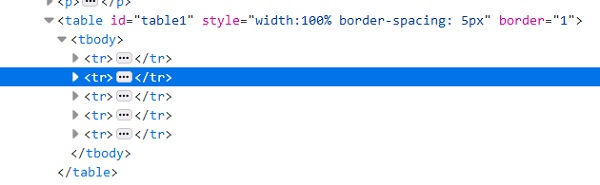
To retrieve the rows count of the table, we will use−
List<WebElement> rows =driver.findElements(By.tagName("tr"));
int rws_cnt= rows.size();
To retrieve the columns count of the table, we will use−
List<WebElement> cols =driver.findElements(By.tagName("td"));
int cols_cnt= cols.size();
Example
import org.openqa.selenium.By;
import org.openqa.selenium.WebDriver;
import org.openqa.selenium.WebElement;
import org.openqa.selenium.chrome.ChromeDriver;
import java.util.concurrent.TimeUnit;

public class TableCellValue{
   public static void main(String[] args) {
System.setProperty("webdriver.chrome.driver","C:\Users\ghs6kor\Desktop\Java\chromedriver.exe");
         WebDriver driver = new ChromeDriver();
         String u="https://sqengineer.com/practice-sites/practice-tables-selenium/";
         driver.get(u);
         driver.manage().timeouts().implicitlyWait(5, TimeUnit.SECONDS);
         // identify table
         WebElement t = driver.findElement(By.xpath("//*[@id='table1']/tbody"));
         // count rows with size() method
         List<WebElement> rws = t.findElements(By.tagName("tr"));
         int rws_cnt = rws.size();
         //iterate rows of table
         for (int i = 0;i < rws_cnt; i++) {
         // count columns with size() method
         List<WebElement> cols = rws.get(i).findElements(By.tagName("td"));
         int cols_cnt = cols.size();
         //iterate cols of table
         for (int j = 0;j < cols_cnt; j++) {
         // get cell text with getText()
         String c = cols.get(j).getText();
      System.out.println("The cell value is: " + c);
   }
}
      driver.quit();
   }
}
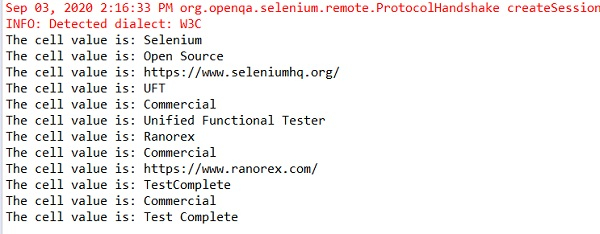
Output

Updated on: 2020-09-18T08:30:23+05:30
6K+ Views

Advertisements