
- Trending Categories
 Data Structure
 Networking
 RDBMS
RDBMS Operating System
 Java
Java MS Excel
 iOS
iOS HTML
HTML CSS
CSS Android
 Python
 C Programming
 C++
C++ C#
C# MongoDB
 MySQL
MySQL Javascript
 PHP
PHP Physics
 Chemistry
 Biology
 Mathematics
 English
 Economics
 Psychology
 Social Studies
 Fashion Studies
 Legal Studies
- Selected Reading
- UPSC IAS Exams Notes
- Developer's Best Practices
- Questions and Answers
- Effective Resume Writing
- HR Interview Questions
- Computer Glossary
- Who is Who
How to get the list of local groups using PowerShell?
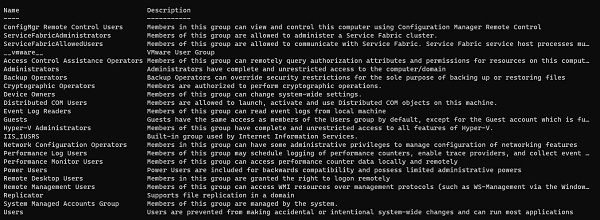
To get the local groups on the windows system using PowerShell, you can use the Get-LocalGroup (Module: Microsoft.PowerShell.LocalAccounts) command. This command will list down all the groups on the particular system.
If we check the properties of this command, it supports Name, Description, ObjectClass (user or group), PrincipalSource (ComputerName – Local or Remote), SID (Security Identifier).
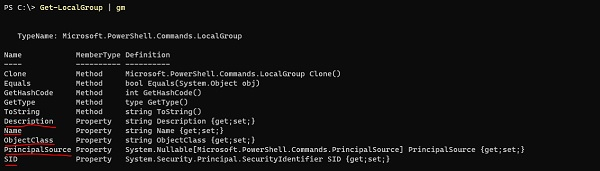
We will select them,
PS C:\> Get-LocalGroup | Select Name, Objectclass, Principalsource,sid
Name                                              ObjectClass PrincipalSource    SID
----                                              -----------  ---------------   ---
LocalAdminGroup                                     Group                         S-1-5-21-
3679408808-4189780139-2861908768-1003
Access Control Assistance Operators                 Group                         S-1-5-32-579
Administrators                                      Group                         S-1-5-32-544
Backup Operators                                    Group                         S-1-5-32-551
Certificate Service DCOM Access                     Group                         S-1-5-32-574
Cryptographic Operators                             Group                         S-1-5-32-569
Distributed COM Users                               Group                         S-1-5-32-562
Event Log Readers                                   Group                         S-1-5-32-573
Guests                                              Group                         S-1-5-32-546
Hyper-V Administrators                              Group                         S-1-5-32-578
IIS_IUSRS                                           Group                         S-1-5-32-568
You can retrieve the Local Groups information on the remote system using the Invoke-Command method.
Invoke-Command -ComputerName Test1-Win2k16 -ScriptBlock{ Get-LocalGroup}
Please note − This command supports from the PS version 5.1 onwards. For the earlier versions, we can use the cmd command “Net LocalGroup”. For example,
PS C:\Users\Administrator> net localgroup
Aliases for \ADDC
------------------------------------------------------------------
*Access Control Assistance Operators
*Account Operators
*Administrators
*Allowed RODC Password Replication Group
*Backup Operators
*Cert Publishers
*Certificate Service DCOM Access
*Cryptographic Operators
*Denied RODC Password Replication Group
*Distributed COM Users
*DnsAdmins
*Event Log Readers
*Guests
*Hyper-V Administrators
*IIS_IUSRS
*Incoming Forest Trust Builders
*LocalAdminGroup
*Network Configuration Operators
*Performance Log Users
*Performance Monitor Users
*Pre-Windows 2000 Compatible Access
*Print Operators
*RAS and IAS Servers
*RDS Endpoint Servers
On the remote server,
Invoke-Command -ComputerName Test1-Win2k16 -ScriptBlock{Net localgroup}
Please note − To run the above command, Remote servers must use the PowerShell version 5.1 or the advanced.

14K+ Views
