
- Trending Categories
 Data Structure
 Networking
 RDBMS
RDBMS Operating System
 Java
Java MS Excel
 iOS
iOS HTML
HTML CSS
CSS Android
 Python
 C Programming
 C++
C++ C#
C# MongoDB
 MySQL
MySQL Javascript
 PHP
PHP Physics
 Chemistry
 Biology
 Mathematics
 English
 Economics
 Psychology
 Social Studies
 Fashion Studies
 Legal Studies
- Selected Reading
- UPSC IAS Exams Notes
- Developer's Best Practices
- Questions and Answers
- Effective Resume Writing
- HR Interview Questions
- Computer Glossary
- Who is Who
How to handle frame in WebDriver?
We can handle frames in Selenium webdriver. The frames in an html code are represented by the frames/iframe tag. Selenium can handle frames by switching the webdriver access from the main page to the frame.
Methods to handle frames are listed below −
driver.switch_to_frame("frame name") - frame name is the name of the frame.
driver.switch_to_frame("framename.0.frame1") - used to access the subframe in a frame by separating the path with a dot. Here, it would point to the frame with the name frame1 which is the first sub-frame of the frame named framename.
driver.switch_to_default_content() - used to switch the webdriver access from a frame to the main page.
Let us see the html code of an element inside a frame.
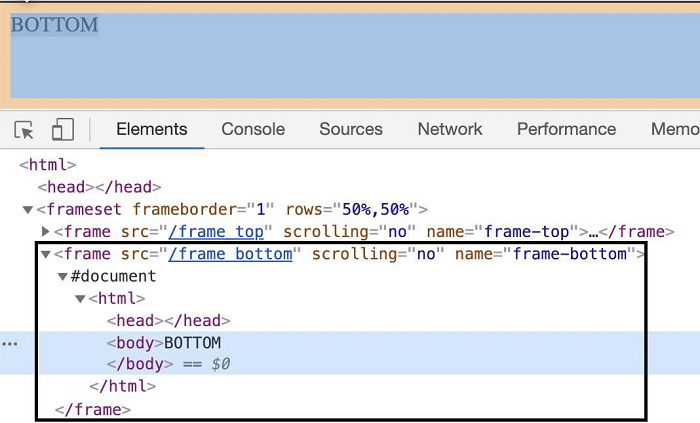
The tagname highlighted in the above image is frame and the value of the name attribute is frame_bottom.
Example
Code Implementation
from selenium import webdriver
driver = webdriver.Chrome(executable_path='../drivers/chromedriver')
#implicit wait time
driver.implicitly_wait(5)
#url launch
driver.get("https://the-internet.herokuapp.com/nested_frames")
#switch to frame
driver.switch_to.frame('frame-bottom')
#identify source element
s = driver.find_element_by_tag_name("body")
#obtain text
t = s.text
print('Text is: ' + t)
#quit browser
driver.quit()
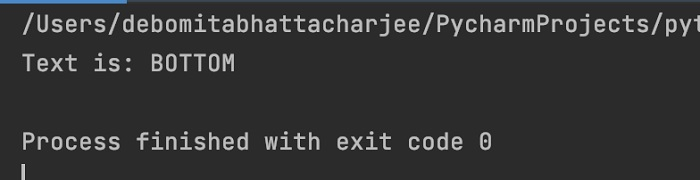
Output

352 Views
