
- Trending Categories
 Data Structure
 Networking
 RDBMS
RDBMS Operating System
 Java
Java MS Excel
 iOS
iOS HTML
HTML CSS
CSS Android
 Python
 C Programming
 C++
C++ C#
C# MongoDB
 MySQL
MySQL Javascript
 PHP
PHP Physics
 Chemistry
 Biology
 Mathematics
 English
 Economics
 Psychology
 Social Studies
 Fashion Studies
 Legal Studies
- Selected Reading
- UPSC IAS Exams Notes
- Developer's Best Practices
- Questions and Answers
- Effective Resume Writing
- HR Interview Questions
- Computer Glossary
- Who is Who
How to have actual values in Matplotlib Pie Chart displayed?
To have actual or any custom values in Matplotlib pie chart displayed, we can take the following steps −
- Set the figure size and adjust the padding between and around the subplots.
- Make lists of labels, fractions, explode position and get the sum of fractions to calculate the percentage
- Make a pie chart using labels, fracs and explode with autopct=lambda p: <calculation for percentage>.
- To display the figure, use show() method.
Example
import matplotlib.pyplot as plt

plt.rcParams["figure.figsize"] = [7.50, 3.50]
plt.rcParams["figure.autolayout"] = True

labels = ('Read', 'Eat', 'Sleep', 'Repeat')

fracs = [5, 3, 4, 1]
total = sum(fracs)
explode = (0, 0.05, 0, 0)

plt.pie(fracs, explode=explode, labels=labels,
   autopct=lambda p: '{:.0f}%'.format(p * total / 100),
   shadow=True, startangle=90)

plt.show()
Output
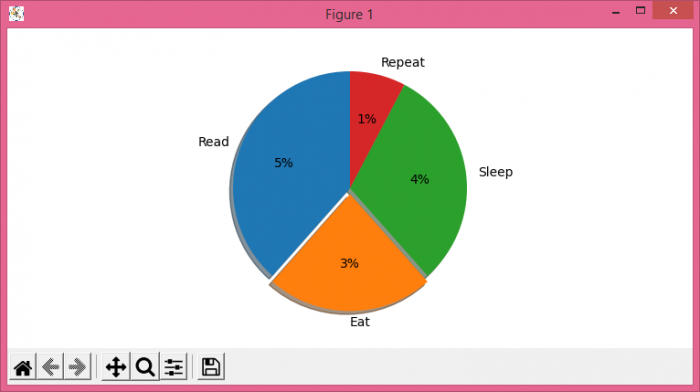

Updated on: 2021-06-17T12:05:32+05:30
7K+ Views

Advertisements