
- Trending Categories
 Data Structure
 Networking
 RDBMS
RDBMS Operating System
 Java
Java MS Excel
 iOS
iOS HTML
HTML CSS
CSS Android
 Python
 C Programming
 C++
C++ C#
C# MongoDB
 MySQL
MySQL Javascript
 PHP
PHP Physics
 Chemistry
 Biology
 Mathematics
 English
 Economics
 Psychology
 Social Studies
 Fashion Studies
 Legal Studies
- Selected Reading
- UPSC IAS Exams Notes
- Developer's Best Practices
- Questions and Answers
- Effective Resume Writing
- HR Interview Questions
- Computer Glossary
- Who is Who
How to increase the width of axes using ggplot2 in R?
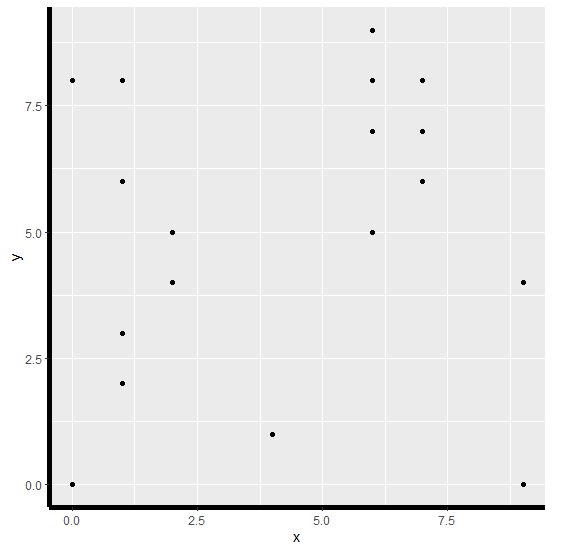
To increase the width of axes (both X-axis and Y-axis at the same time) using ggplot2 in R, we can use theme function with axis.line argument where we can set element_line argument to a larger value.
Check out the Example given below to understand how it can be done.
Example
Following snippet creates a sample data frame −
x<-sample(0:9,20,replace=TRUE)
y<-sample(0:9,20,replace=TRUE)
df<-data.frame(x,y)
df
The following dataframe is created
   x y
 1 6 9
 2 7 8
 3 1 3
 4 2 4
 5 1 2
 6 2 5
 7 2 4
 8 1 6
 9 4 1
10 7 6
11 0 8
12 9 0
13 9 4
14 1 8
15 6 5
16 7 7
17 0 0
18 6 7
19 1 6
20 6 8
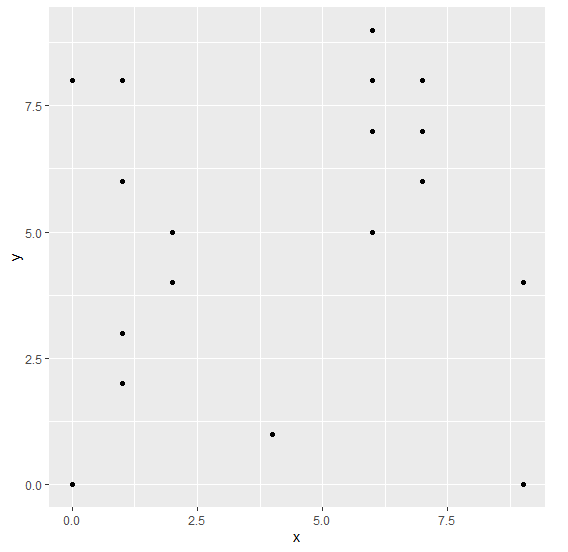
To load ggplot2 package and create scatterplot between x and y on the above created data frame, add the following code to the above snippet −
x<-sample(0:9,20,replace=TRUE)
y<-sample(0:9,20,replace=TRUE)
df<-data.frame(x,y)
library(ggplot2)
ggplot(df,aes(x,y))+geom_point()
Output
If you execute all the above given snippets as a single program, it generates the following Output −
To create scatterplot between x and y with increased width of both the axes on the above created data frame, add the following code to the above snippet −
x<-sample(0:9,20,replace=TRUE)
y<-sample(0:9,20,replace=TRUE)
df<-data.frame(x,y)
library(ggplot2)
ggplot(df,aes(x,y))+geom_point()+theme(axis.line=element_line(size=2))
Output
If you execute all the above given snippets as a single program, it generates the following Output −

7K+ Views
