
- Trending Categories
 Data Structure
 Networking
 RDBMS
RDBMS Operating System
 Java
Java MS Excel
 iOS
iOS HTML
HTML CSS
CSS Android
 Python
 C Programming
 C++
C++ C#
C# MongoDB
 MySQL
MySQL Javascript
 PHP
PHP Physics
 Chemistry
 Biology
 Mathematics
 English
 Economics
 Psychology
 Social Studies
 Fashion Studies
 Legal Studies
- Selected Reading
- UPSC IAS Exams Notes
- Developer's Best Practices
- Questions and Answers
- Effective Resume Writing
- HR Interview Questions
- Computer Glossary
- Who is Who
How to install and setup Deepseek in laptop
What is DeepSeek?
DeepSeek is one of the most advanced AI platform for its language Modes, high-performance and cost-efficient. DeepSeek offers various models such as DeepSeek-V3 and DeepSeek-R1 are basically designed for tasks like coding, reasoning etc. It offers open-source alternatives to other AI, making it accessible for developers and businesses.
Prerequisites To Install DeepSeek
DeepSeek AI application can be installed on various Operating systems. such as -
Operating System
1.Windows 10 or later
2.Linux(Ubuntu 18.04 or later)
3.macOS 10.15 or later
Hardware requirements
1. CPU Multi-core processor (Quad- core or higher recommended)
3. RAM Minimum 8GB (16GB recommended for optimal performance)
4. Storage SSD with at least 20GB free space.
5. Processor 1.5GHz+, 64-bit recommended for windows 10/11 users with > 4GB RAM.
Download and Install DeepSeek AI on Your Laptop or PC
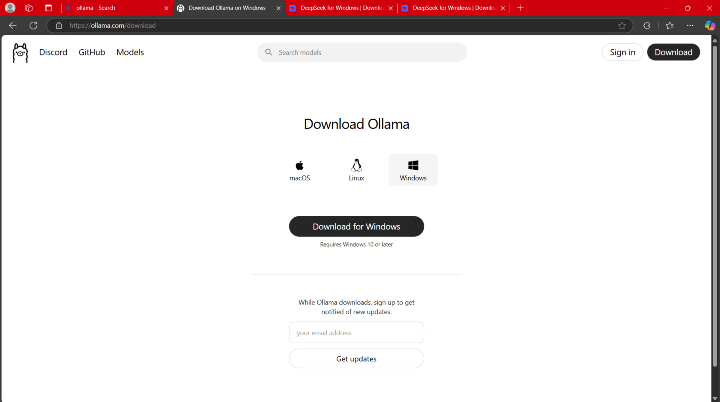
Step 1 Download Ollama
Visit official website https://ollama.com/ and download the Ollama software required to run DeepSeek locally. Ensure you download the version that matches your Operating System.
Step 2 Install Ollama
Once installation done, proceed with the setup as per your operating system.
After Ollama installation step-by-step guide for each operating system are as -
1. Installation and setup for windows -
Step 1 - Open the command prompt.
Step 2 - Run the given below command to install DeepSeek model
ollama run deepseek-r1 1.5b
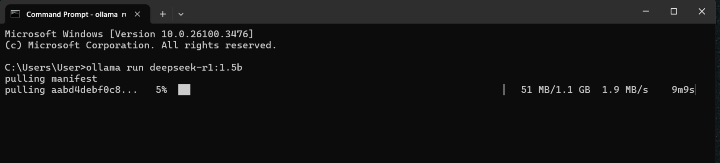
This will download and configure the DeepSeek model.
after installation you can search in your terminal.
2. Installation and setup for Mac -
Step 1 -Launch Ollama app and select "Install Command lines Tools."
Step 2 - Confirm installation by running below given commandin the terminal
ollama --version
Step 3 - Install DeepSeek Model using given command in the terminal
ollama run deepseek-r1 1.5b
3. Installation and setup for Linux -
Step 1 - Open Terminal.
Step 2 - Install Ollama by running below commands
curl -fsSL https //ollama.com/install.sh | sh
Step 3 - Verify installation by running below commands
ollama --version
Step 4 - Install DeepSeek Model by running below commands
ollama run deepseek-r1 1.5b

416 Views
