
- Trending Categories
 Data Structure
 Networking
 RDBMS
RDBMS Operating System
 Java
Java MS Excel
 iOS
iOS HTML
HTML CSS
CSS Android
 Python
 C Programming
 C++
C++ C#
C# MongoDB
 MySQL
MySQL Javascript
 PHP
PHP Physics
 Chemistry
 Biology
 Mathematics
 English
 Economics
 Psychology
 Social Studies
 Fashion Studies
 Legal Studies
- Selected Reading
- UPSC IAS Exams Notes
- Developer's Best Practices
- Questions and Answers
- Effective Resume Writing
- HR Interview Questions
- Computer Glossary
- Who is Who
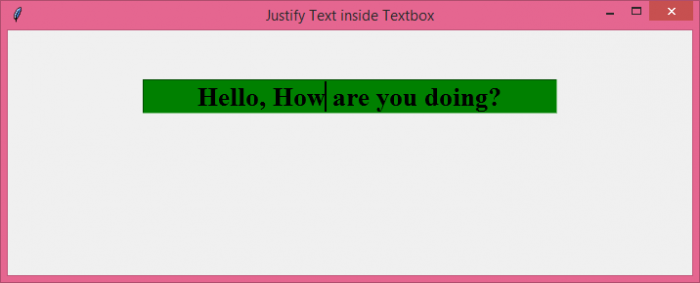
How to place the text at the center of an Entry box in Tkinter?
To put a border around a Frame in Tkinter, we have to use the highlightbackground and highlightthickeness parameters while creating the Frame. Let's take an example and see how to use these two parameters.
Steps −
Import the tkinter library and create an instance of tkinter frame.
Set the size of the frame using geometry method.
Create a frame with Frame() method. Highlight the border of the frame with a color, highlightbackground="blue". Then, set the thickness of the border, highlightthickness=2.
Next, create some widgets inside the frame. In the example, we have placed four checkbuttons and a button inside the frame.
Finally, run the mainloop of the application window.
Example
# Import the libraries
from tkinter import *

# Create an instance of tkinter frame or window
win = Tk()

# Title of window
win.title("Justify Text inside Textbox")

# Dimensions of the window
win.geometry("700x250")

# Entry widget
my_text = Entry(win, width=30, justify=CENTER, bg="green", font=('Times', 20,'bold'))
my_text.insert(0, "Hello, How are you doing?")
my_text.pack(padx=50, pady=50)

# Run the mainloop
win.mainloop()
Output
It will produce the following output −

Updated on: 2021-10-26T13:44:13+05:30
10K+ Views

Advertisements