
- Trending Categories
 Data Structure
 Networking
 RDBMS
RDBMS Operating System
 Java
Java MS Excel
 iOS
iOS HTML
HTML CSS
CSS Android
 Python
 C Programming
 C++
C++ C#
C# MongoDB
 MySQL
MySQL Javascript
 PHP
PHP Physics
 Chemistry
 Biology
 Mathematics
 English
 Economics
 Psychology
 Social Studies
 Fashion Studies
 Legal Studies
- Selected Reading
- UPSC IAS Exams Notes
- Developer's Best Practices
- Questions and Answers
- Effective Resume Writing
- HR Interview Questions
- Computer Glossary
- Who is Who
How to use Selenium IDE?
We can use Selenium IDE with the help of the Firefox browser. The steps required to install it are listed below −
Step1 − Open the Firefox browser and launch the URL − https://addons.mozilla.org/en-US/firefox/addon/selenium-ide/..
Step2 − Click on the Add to Firefox button.

Step3 − A browser pop-up gets opened. Click on Add.

Step4 − The success message - Selenium IDE has been added to Firefox gets displayed along with the Selenium IDE icon created on the browser menu.
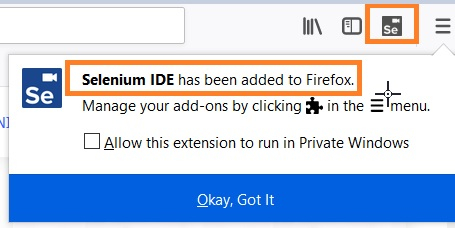
Step5 − Click on the icon, to launch the Selenium IDE.


Updated on: 2021-06-25T12:53:23+05:30
348 Views

Advertisements