
- Trending Categories
 Data Structure
 Networking
 RDBMS
RDBMS Operating System
 Java
Java MS Excel
 iOS
iOS HTML
HTML CSS
CSS Android
 Python
 C Programming
 C++
C++ C#
C# MongoDB
 MySQL
MySQL Javascript
 PHP
PHP Physics
 Chemistry
 Biology
 Mathematics
 English
 Economics
 Psychology
 Social Studies
 Fashion Studies
 Legal Studies
- Selected Reading
- UPSC IAS Exams Notes
- Developer's Best Practices
- Questions and Answers
- Effective Resume Writing
- HR Interview Questions
- Computer Glossary
- Who is Who
How to use Selenium WebDriver for Web Automation?
We can use Selenium webdriver for web automation. For this we need to follow the below steps −
Step 1 − The Webdriver should be created. For example,
WebDriver driver = new ChromeDriver();
The above piece of code is used to create a webdriver instance and initiate the script execution in the Chrome browser.
Step 2 − Launch the URL on which we want to perform the UI testing. For example,
driver.get("https://www.tutorialspoint.com/index.htm");
The above piece of code shall launch the URL passed as a parameter to the get method.
Step 3 − Identify web elements with the help of any of the locators like id, class, name, tag name, link text, partial link text, CSS, or XPath. The method - findElement is used to identify the element with these locators. For example,
WebElement e = driver.findElement(By.id("txt"));
The above code is used to identify an element with the help of the locator id.
Step 4 − After the element has been located, perform an action on it like inputting a text, clicking, and so on. For example,
e.sendKeys("Rest Assured");
The above code is used to input data on the element identified in Step3.
Step 5 − Validate the impact on the webpage on performing the operation in Step4. For example,
String st = e.getAttribute("value");
Assert.assertEquals(st, "Rest Assured");
The above code is used to compare and verify if the actual value is equal to the expected value - Selenium.
Step 6 − Add a testing framework like TestNG/JUnit to the test. The details on how to set up TestNG is available in the below link −
https://www.tutorialspoint.com/testng/index.htm
Step 7 − Execute the test and record the result created with a test framework.
Step 8 − Finish the test by quitting the webdriver session. For example,
driver.quit();
Example
Code Implementation
import java.util.concurrent.TimeUnit;
import org.openqa.selenium.By;
import org.openqa.selenium.WebDriver;
import org.openqa.selenium.WebElement;
import org.openqa.selenium.chrome.ChromeDriver;
import org.testng.Assert;
import org.testng.annotations.Test;
public class NewTest {
   @Test
   public void f() {
      System.setProperty("webdriver.chrome.driver", "chromedriver");

      //webdriver instance
      WebDriver driver = new ChromeDriver();

      // implicit wait
      driver.manage().timeouts().implicitlyWait(5, TimeUnit.SECONDS);

      //url launch
      driver.get("https://www.tutorialspoint.com/index.htm");

      //element identify
      WebElement elm = driver.findElement(By.tagName("input"));

      //perform action - input text
      elm.sendKeys("Selenium");
      String s = elm.getAttribute("value");

      //validate result with Assertion
      Assert.assertEquals(s, "Selenium");

      //quit browser
      driver.quit();
   }
}
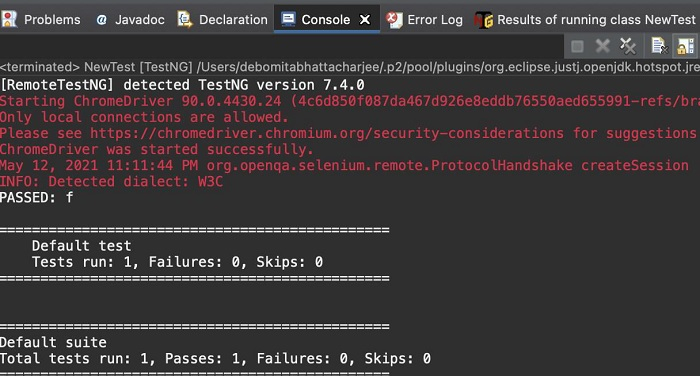
Output

699 Views
