
- Trending Categories
 Data Structure
 Networking
 RDBMS
RDBMS Operating System
 Java
Java MS Excel
 iOS
iOS HTML
HTML CSS
CSS Android
 Python
 C Programming
 C++
C++ C#
C# MongoDB
 MySQL
MySQL Javascript
 PHP
PHP Physics
 Chemistry
 Biology
 Mathematics
 English
 Economics
 Psychology
 Social Studies
 Fashion Studies
 Legal Studies
- Selected Reading
- UPSC IAS Exams Notes
- Developer's Best Practices
- Questions and Answers
- Effective Resume Writing
- HR Interview Questions
- Computer Glossary
- Who is Who
HTML canvas shadowOffsetY Property
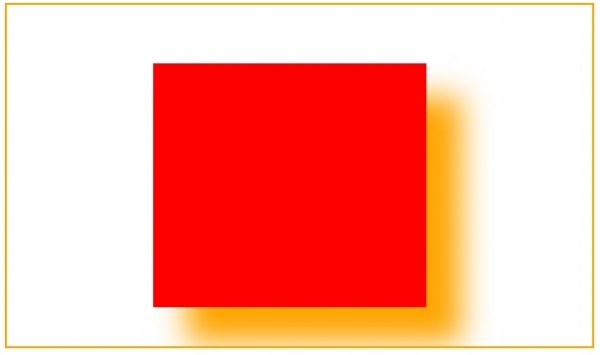
The shadowOffsetY property of the HTML canvas is used to set the vertical distance of the shadow from the shape. The <canvas> element allows you to draw graphics on a web page using JavaScript. Every canvas has two elements that describes the height and width of the canvas i.e. height and width respectively.
Following is the syntax −
context.shadowOffsetY=num;
Here, num represents the vertical distance in pixels.
Let us now see an example to implement the shadowOffsetY property of canvas −
Example
<!DOCTYPE html>
<html>
<body>
<canvas id="newCanvas" width="600" height="350" style="border:2px solid orange;">
</canvas>
<script>
   var c = document.getElementById("newCanvas");
   var ctx = c.getContext("2d");
   ctx.shadowBlur = 30;
   ctx.shadowOffsetX = 35;
   ctx.shadowOffsetY = 35;
   ctx.shadowColor = "orange";
   ctx.fillStyle = "red";
   ctx.fillRect(150, 60, 280, 250);
</script>
</body>
</html>
Output

Updated on: 2019-07-30T22:30:26+05:30
120 Views

Advertisements