
- Trending Categories
 Data Structure
 Networking
 RDBMS
RDBMS Operating System
 Java
Java MS Excel
 iOS
iOS HTML
HTML CSS
CSS Android
 Python
 C Programming
 C++
C++ C#
C# MongoDB
 MySQL
MySQL Javascript
 PHP
PHP Physics
 Chemistry
 Biology
 Mathematics
 English
 Economics
 Psychology
 Social Studies
 Fashion Studies
 Legal Studies
- Selected Reading
- UPSC IAS Exams Notes
- Developer's Best Practices
- Questions and Answers
- Effective Resume Writing
- HR Interview Questions
- Computer Glossary
- Who is Who
HTML DOM MouseEvent screenX Property
The HTML DOM MouseEvent screenX property returns the horizontal (x) coordinate of the mouse pointer relative to the users screen display if a mouse event was triggered. Use with screenY to get the vertical coordinate as well.
Following is the syntax −
Returning reference to the screenX object
MouseEventObject.screenX
Let us see an example of MouseEvent screenX property −
Example
<!DOCTYPE html>
<html>
<head>
<title>MouseEvent screenX</title>
<style>
   * {
      padding: 2px;
      margin:5px;
   }
   form {
      width:70%;
      margin: 0 auto;
      text-align: center;
   }
   #outer {
      width:70%;
      margin: 0 auto;
      padding: 0;
      text-align: center;
      border:1px solid black;
      height: 105px;
      background-color: #28a745;
   }
   input[type="button"] {
      border-radius: 10px;
   }
   #upper {
      border-bottom: 1px solid black;
      height: 40px;
      margin: 0 0 15px 0;
      background-color: #DC3545;
   }
   #lower {
      border-top: 1px solid black;
      height: 40px;
      margin: 15px 0 0 0;
      background-color: #DC3545;
   }
</style>
</head>
<body>
   <form>
      <fieldset>
         <legend>MouseEvent-screenX</legend>
         <div id="outer">
         <div id="upper"><h2>Danger</h2></div>
         <div id="lower"><h2>Danger</h2></div>
         </div>
         <input type="button" id="start" value="Start" onclick="gameStart()">
         <div id="divDisplay"></div>
      </fieldset>
   </form>
<script>
   var divDisplay = document.getElementById('divDisplay');
   var gameDisplay = document.getElementById('outer');
   function playGame(event) {
      var x = event.screenX;
      var y = event.screenY;
         if(y > 330 && y < 345){
            divDisplay.textContent = 'Keep Going!';
               if(x === 1171){
                  divDisplay.textContent = 'Congrats! You Did it!';
                  gameDisplay.removeEventListener('mousemove', playGame);
               }
         }
         else{
            divDisplay.textContent = 'You moved to DANGER area. You loose!';
            gameDisplay.removeEventListener('mousemove', playGame);
         }
   }
   function gameStart(){
      gameDisplay.addEventListener('mousemove',playGame);
   }
</script>
</body>
</html>
Output
After clicking ‘Start’ button and cursor in green (safe) area −

After clicking ‘Start’ button and cursor at end of green (safe) area −
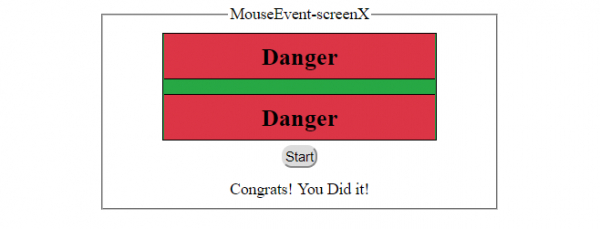
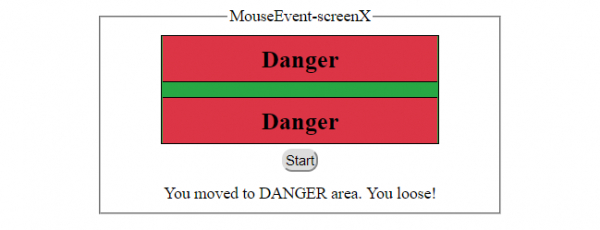
After clicking ‘Start’ button and cursor in red (danger) area −

Updated on: 2019-10-24T12:33:14+05:30
106 Views

Advertisements