
- Trending Categories
 Data Structure
 Networking
 RDBMS
RDBMS Operating System
 Java
Java MS Excel
 iOS
iOS HTML
HTML CSS
CSS Android
 Python
 C Programming
 C++
C++ C#
C# MongoDB
 MySQL
MySQL Javascript
 PHP
PHP Physics
 Chemistry
 Biology
 Mathematics
 English
 Economics
 Psychology
 Social Studies
 Fashion Studies
 Legal Studies
- Selected Reading
- UPSC IAS Exams Notes
- Developer's Best Practices
- Questions and Answers
- Effective Resume Writing
- HR Interview Questions
- Computer Glossary
- Who is Who
HTML DOM Window frames Property
The HTML DOM Window frames property returns an object corresponding to the window, representing all frames present in it.
Syntax
Following is the syntax −
Returning frames in current window
window.frames
Let us see an example of HTML DOM Window frames property −
Example
<!DOCTYPE html><html>
<head>
<title>HTML DOM Window frames</title>
<style>
   * {
      padding: 2px;
      margin:5px;
   }
   form {
      width:70%;
      margin: 0 auto;
      text-align: center;
   }
   input[type="button"] {
      border-radius: 10px;
</style
></head>
<body>
   <form>
      <fieldset>
         <legend>HTML-DOM-Window-frames</legend>
         <label>User 1:</label><iframe src="https://www.example.com"></iframe><br>
         <label>User 2:</label><iframe src="https://www.example.com"></iframe><br>
         <input type="button" value="Launch Virus" onclick="goToURL()">
         <div id="divDisplay">
         </div>
      </fieldset>
   </form>
   <script>
      var divDisplay = document.getElementById("divDisplay");
      function goToURL() {
         for (var i = window.frames.length - 1; i >= 0; i--)
            window.frames[i].location = "http://www.tutorialspoint.com/html5/foo.mp4";
            divDisplay.textContent = 'Virus Deployed';
      }
   </script>
</body>
</html>
Output
Before clicking ‘Launch Virus’ button −
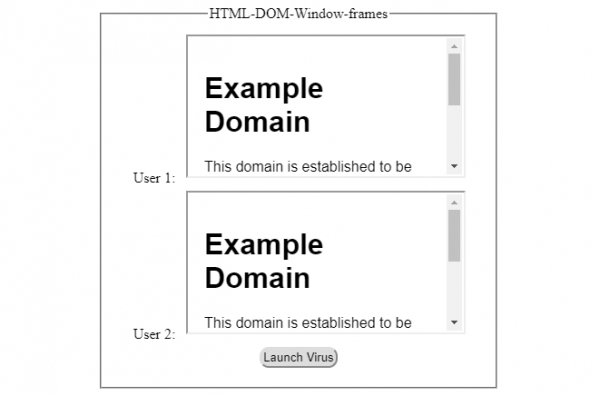
After clicking ‘Launch Virus’ button −


Updated on: 2021-12-21T07:57:17+05:30
242 Views

Advertisements