
- Trending Categories
 Data Structure
 Networking
 RDBMS
RDBMS Operating System
 Java
Java MS Excel
 iOS
iOS HTML
HTML CSS
CSS Android
 Python
 C Programming
 C++
C++ C#
C# MongoDB
 MySQL
MySQL Javascript
 PHP
PHP Physics
 Chemistry
 Biology
 Mathematics
 English
 Economics
 Psychology
 Social Studies
 Fashion Studies
 Legal Studies
- Selected Reading
- UPSC IAS Exams Notes
- Developer's Best Practices
- Questions and Answers
- Effective Resume Writing
- HR Interview Questions
- Computer Glossary
- Who is Who
Putting arrowheads on vectors in Matplotlib's 3D plot
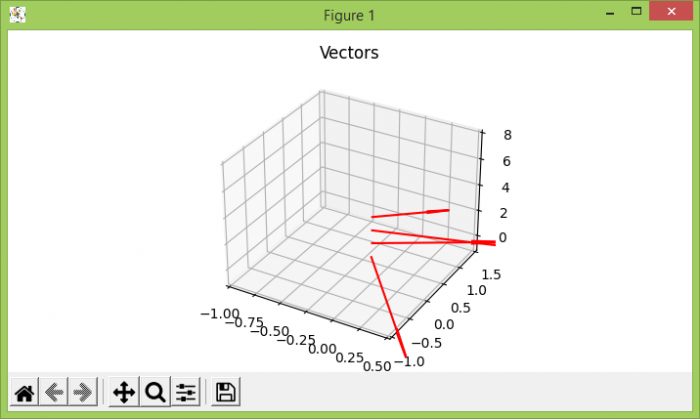
To draw arrow heads vectors in 3D matplotlb's plot, we can take the following steps −
Create a 2D array, where x, y, z, u, v and w are the coordinates of the arrow locations and direction components of arrow vectors.
Using figure() method, create a new figure or activate an existing figure.
Add an '~.axes.Axes' to the figure as part of a subplot arrangement, using add_subplot() method.
Plot a 3D field of arrows, using quiver() method.
Using ylim, xlim, zlim, limit the range of the axes.
Set the title of the plot.
To display the figure, use show() method.
Example
import matplotlib.pyplot as plt
import numpy as np
plt.rcParams["figure.figsize"] = [7.00, 3.50]
plt.rcParams["figure.autolayout"] = True
soa = np.array([[0, 0, 1, 1, -2, 0], [0, 0, 2, 1, 1, 0], [0, 0, 3, 2, 1, 0], [0, 0, 4, 0.5, 0.7, 0]])
X, Y, Z, U, V, W = zip(*soa)
fig = plt.figure()
ax = fig.add_subplot(projection='3d')
ax.quiver(X, Y, Z, U, V, W, color='red')
ax.set_xlim([-1, 0.5])
ax.set_ylim([-1, 1.5])
ax.set_zlim([-1, 8])
ax.set_title("Vectors")
plt.show()
Output

Updated on: 2021-05-07T07:47:53+05:30
2K+ Views

Advertisements