
- Trending Categories
 Data Structure
 Networking
 RDBMS
RDBMS Operating System
 Java
Java MS Excel
 iOS
iOS HTML
HTML CSS
CSS Android
 Python
 C Programming
 C++
C++ C#
C# MongoDB
 MySQL
MySQL Javascript
 PHP
PHP Physics
 Chemistry
 Biology
 Mathematics
 English
 Economics
 Psychology
 Social Studies
 Fashion Studies
 Legal Studies
- Selected Reading
- UPSC IAS Exams Notes
- Developer's Best Practices
- Questions and Answers
- Effective Resume Writing
- HR Interview Questions
- Computer Glossary
- Who is Who
Removing Horizontal Lines in image (OpenCV, Python, Matplotlib)
To remove horizontal lines in an image, we can take the following steps −
- Read a local image.
- Convert the image from one color space to another.
- Apply a fixed-level threshold to each array element.
- Get a structuring element of the specified size and shape for morphological operations.
- Perform advanced morphological transformations.
- Find contours in a binary image.
- Repeat step 4 with different kernel size.
- Repeat step 5 with a new kernel from step 7.
- Show the resultant image.
Example
import cv2

image = cv2.imread('input_image.png')
cv2.imshow('source_image', image)

gray = cv2.cvtColor(image, cv2.COLOR_BGR2GRAY)
thresh = cv2.threshold(gray, 0, 255, cv2.THRESH_BINARY_INV + cv2.THRESH_OTSU)[1]

horizontal_kernel = cv2.getStructuringElement(cv2.MORPH_RECT, (25, 1))
detected_lines = cv2.morphologyEx(thresh, cv2.MORPH_OPEN,
horizontal_kernel, iterations=2)

cnts = cv2.findContours(detected_lines, cv2.RETR_EXTERNAL, cv2.CHAIN_APPROX_SIMPLE)
cnts = cnts[0] if len(cnts) == 2 else cnts[1]

for c in cnts:
   cv2.drawContours(image, [c], -1, (255, 255, 255), 2)

repair_kernel = cv2.getStructuringElement(cv2.MORPH_RECT, (1, 6))

result = 255 - cv2.morphologyEx(255 - image, cv2.MORPH_CLOSE, repair_kernel,
iterations=1)

cv2.imshow('resultant image', result)
cv2.waitKey()
cv2.destroyAllWindows()
Output
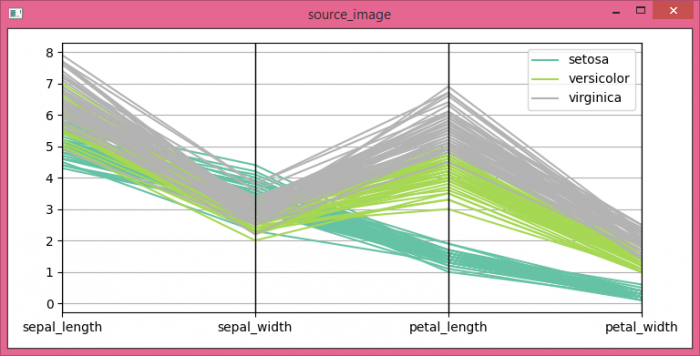

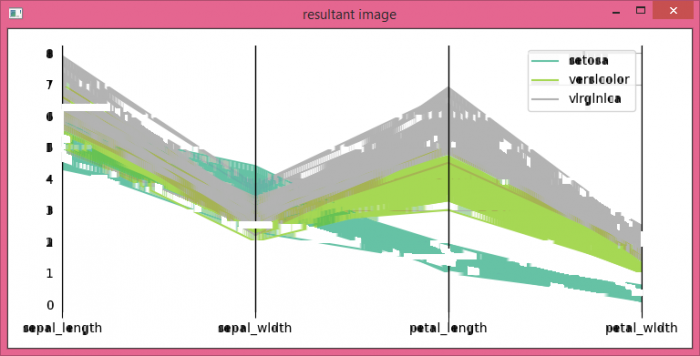
Observe that the horizontal lines in our source_image are no longer visible in the resultant_image.

Updated on: 2021-06-05T07:41:47+05:30
3K+ Views

Advertisements