
- Trending Categories
 Data Structure
 Networking
 RDBMS
RDBMS Operating System
 Java
Java MS Excel
 iOS
iOS HTML
HTML CSS
CSS Android
 Python
 C Programming
 C++
C++ C#
C# MongoDB
 MySQL
MySQL Javascript
 PHP
PHP Physics
 Chemistry
 Biology
 Mathematics
 English
 Economics
 Psychology
 Social Studies
 Fashion Studies
 Legal Studies
- Selected Reading
- UPSC IAS Exams Notes
- Developer's Best Practices
- Questions and Answers
- Effective Resume Writing
- HR Interview Questions
- Computer Glossary
- Who is Who
Rename column name with an index number of the CSV file in Pandas
Using columns.values(), we can easily rename column name with index number of a CSV file.
Let’s say the following are the contents of our CSV file opened in Microsoft Excel −
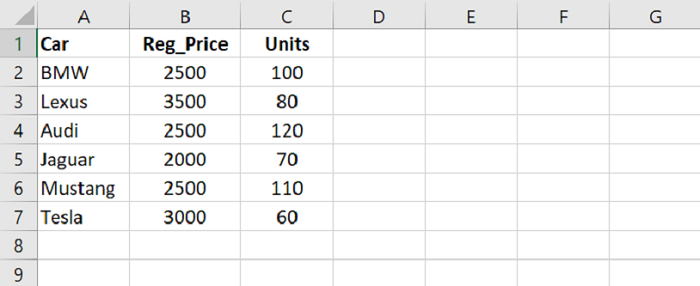
We will rename the column names. At first, load data from a CSV file into a Pandas DataFrame −
dataFrame = pd.read_csv("C:\Users\amit_\Desktop\SalesData.csv")
Display all the column names from the CSV −
dataFrame.columns
Now, rename column names −
dataFrame.columns.values[0] = "Car Names"
dataFrame.columns.values[1] = "Registration Cost"
dataFrame.columns.values[2] = "Units Sold"
Example
Following is the code −
import pandas as pd

# Load data from a CSV file into a Pandas DataFrame:
dataFrame = pd.read_csv("C:\Users\amit_\Desktop\SalesData.csv")
print("Reading the CSV file...\n",dataFrame)

# displaying column names
res = dataFrame.columns
# displaying another subset
print("\nDisplaying column names : \n",res)

# rename column names from the CSV file
dataFrame.columns.values[0] = "Car Names"
dataFrame.columns.values[1] = "Registration Cost"
dataFrame.columns.values[2] = "Units Sold"

print("\nDisplaying updated column names : \n",res)
Output
This will produce the following output −
Reading the CSV file...
       Car   Reg_Price Units
0      BMW        2500 100
1    Lexus        3500 80
2     Audi        2500 120
3   Jaguar        2000 70
4  Mustang        2500 110

Displaying column names :
Index(['Car','Reg_Price','Units'], dtype='object')

Displaying updated column names :
Index(['Car Names','Registration Cost','Units Sold'], dtype='object')

Updated on: 2021-09-30T11:36:14+05:30
2K+ Views

Advertisements