
- Trending Categories
 Data Structure
 Networking
 RDBMS
RDBMS Operating System
 Java
Java MS Excel
 iOS
iOS HTML
HTML CSS
CSS Android
 Python
 C Programming
 C++
C++ C#
C# MongoDB
 MySQL
MySQL Javascript
 PHP
PHP Physics
 Chemistry
 Biology
 Mathematics
 English
 Economics
 Psychology
 Social Studies
 Fashion Studies
 Legal Studies
- Selected Reading
- UPSC IAS Exams Notes
- Developer's Best Practices
- Questions and Answers
- Effective Resume Writing
- HR Interview Questions
- Computer Glossary
- Who is Who
Setting the spacing between grouped bar plots in Matplotlib
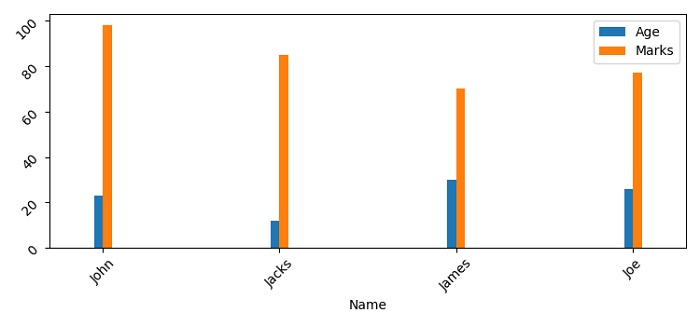
To set the spacing between grouped bar plots in matplotlib, we can take the following steps −
Set the figure size and adjust the padding between and around the subplots.
Create a dictionary for bar details to be plotted.
Make a Pandas dataframe using dictionary, d.
Plot the bar using dictionary, d, with align="center".
To display the figure, use show() method.
Example
import matplotlib.pyplot as plt
import pandas as pd

plt.rcParams["figure.figsize"] = [7.50, 3.50]
plt.rcParams["figure.autolayout"] = True

d = {"Name": ["John", "Jacks", "James", "Joe"],"Age": [23, 12, 30, 26],"Marks": [98, 85, 70, 77]}

df = pd.DataFrame(d)
df.set_index('Name').plot(kind="bar", align='center', width=0.1)
plt.tick_params(rotation=45)

plt.show()
Output

Updated on: 2021-06-03T13:02:08+05:30
3K+ Views

Advertisements