
- Trending Categories
 Data Structure
 Networking
 RDBMS
RDBMS Operating System
 Java
Java MS Excel
 iOS
iOS HTML
HTML CSS
CSS Android
 Python
 C Programming
 C++
C++ C#
C# MongoDB
 MySQL
MySQL Javascript
 PHP
PHP Physics
 Chemistry
 Biology
 Mathematics
 English
 Economics
 Psychology
 Social Studies
 Fashion Studies
 Legal Studies
- Selected Reading
- UPSC IAS Exams Notes
- Developer's Best Practices
- Questions and Answers
- Effective Resume Writing
- HR Interview Questions
- Computer Glossary
- Who is Who
Uninstalling license key in SAP HANA using Studio
You can uninstall the license key (LICENSE ADMIN) using one of the following options −
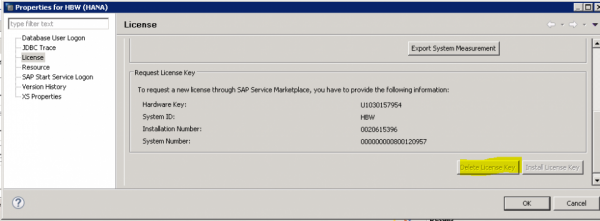
In SAP HANA Studio →In the Systems view, right-click the system and choose Properties → Licenses tab On the System License page choose Delete License Key.
SQL console −
You can also run the SQL command UNSET SYSTEM LICENSE ALL to remove all licenses.

Updated on: 2020-03-13T08:03:33+05:30
1K+ Views

Advertisements