
- Trending Categories
 Data Structure
 Networking
 RDBMS
RDBMS Operating System
 Java
Java MS Excel
 iOS
iOS HTML
HTML CSS
CSS Android
 Python
 C Programming
 C++
C++ C#
C# MongoDB
 MySQL
MySQL Javascript
 PHP
PHP Physics
 Chemistry
 Biology
 Mathematics
 English
 Economics
 Psychology
 Social Studies
 Fashion Studies
 Legal Studies
- Selected Reading
- UPSC IAS Exams Notes
- Developer's Best Practices
- Questions and Answers
- Effective Resume Writing
- HR Interview Questions
- Computer Glossary
- Who is Who
What is equalizeHist() function in OpenCV?
The histogram of an image shows the frequency of pixels' intensity values. In an image histogram, the X-axis shows the gray level intensities and the Y-axis shows the frequency of these intensities.
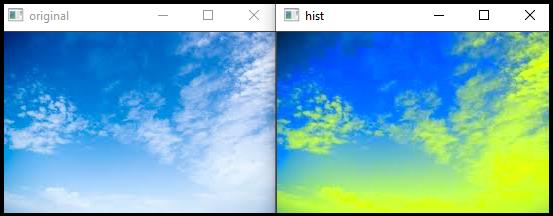
Histogram equalization improves the contrast of an image, in order to stretch out the intensty range. You can equalize the histogram of a given image using the equalizeHist() function.
The basic syntax of this function is −
Syntax
equalizeHist(Source Matrix, Destination Matrix).
In this program, it equalizes a grayscale image. It means that there is only one channel. This function equalized the pixel value of that single channel. However, when we apply this function for a color image, we have to define different channels instead of source and destination matrix. In the following program, we will see the application of equalizehist() in a color image.
The following program demonstrates the equalizeHist() function in OpenCV.
Example
#include<iostream>
#include<opencv2/highgui/highgui.hpp>
#include<opencv2/imgproc/imgproc.hpp>
using namespace cv;
using namespace std;
int main(int argc, const char** argv) {
   Mat original;//Declaring a matrix//
   original = imread("sky.jpg");//loading image//
   vectorchannels;//vector to store each channel in different array//
   Mat hist;//Declaring a matrix//
   cvtColor(original, hist, COLOR_BGR2YCrCb);//Converting from BGR to YCrCB//
   split(hist, channels);//splitting channels//
   equalizeHist(channels[2], channels[2]);//applying histogram equalizer in 2nd channel//
   Mat histeql;//Declaring a matrix//
   merge(channels, hist);//merging equalized channel with actual matrix//
   cvtColor(hist, histeql, COLOR_YCrCb2BGR);//Reconverting to BGR//
   namedWindow("original");//window to show original image//
   namedWindow("hist");//window to show edited image//
   imshow("original", original);//showing original image//
   imshow("hist", histeql);//showing edited image//
   waitKey(0);//wait for keystroke//
   return 0;
}
Output

2K+ Views
